Professional Laptop Overheating Repair & Preventive Cleaning Service
Expert overheating repair and preventive cooling system maintenance for all laptop brands in London. Laptop running hot, loud fans, random shutdowns, or performance throttling? Fixfactor's professional cleaning service restores optimal cooling through deep internal cleaning, thermal paste replacement, and fan maintenance.
This service addresses both emergency overheating problems and preventive maintenance. Regular cleaning every 12 months prevents heat-related damage and maintains peak performance.
Signs Your Laptop Needs Overheating Repair:
- Laptop very hot to touch: Bottom panel or keyboard area gets uncomfortably hot during normal use
- Loud or constant fan noise: Fans running at maximum speed constantly, or making grinding/rattling sounds
- Performance throttling: Laptop becomes slow or laggy when it gets hot, returns to normal when cooled
- Random shutdowns or restarts: Laptop switches off unexpectedly during use, particularly under load (gaming, video editing, multiple programs)
- Blue screen errors mentioning thermal issues: Windows crashes with temperature-related error messages
- Hot air blowing from vents: Exhaust vents blowing extremely hot air, or very little airflow from vents
- System warnings: BIOS temperature warnings, Windows performance alerts, or hardware monitoring software showing high temperatures (90°C+)
- Haven't cleaned in 12+ months: Preventive maintenance due - laptops 2+ years old that have never been cleaned definitely need this service
What Causes Laptop Overheating:
Overheating develops gradually as laptops age. The primary causes are dust accumulation blocking airflow, dried thermal paste losing effectiveness, and fan bearing wear reducing cooling performance.
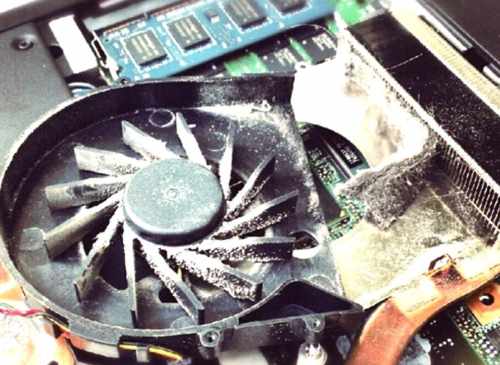
Dust and debris: Dust drawn through cooling vents accumulates inside the laptop, clogging the heatsink fins, fan blades, and air intake areas. This blocks airflow and prevents heat from escaping. Even a thin layer of dust can significantly reduce cooling efficiency.
Degraded thermal paste: Thermal paste (thermal compound) transfers heat from the CPU and GPU to the heatsink. Over 1-2 years, thermal paste dries out, hardens, and loses thermal conductivity. This creates an insulating layer instead of a heat-conducting interface, causing processor temperatures to rise.
Fan bearing wear: Cooling fans have bearings that wear over time. Worn bearings cause noise (grinding, rattling), reduce fan speed efficiency, and eventually lead to fan failure. A failing fan can't move enough air to cool the laptop effectively.
Professional Cooling System Cleaning Process:
Our overheating repair service includes complete internal cleaning, thermal paste replacement, and temperature verification testing.
Step 1: Initial Diagnostics & Temperature Assessment (15-30 minutes)
We boot your laptop and run temperature monitoring software to measure CPU and GPU temperatures under idle and load conditions. We check current fan operation (speed, noise, airflow from vents). We identify your exact laptop model to understand cooling system design and disassembly requirements. If temperatures are normal and laptop isn't actually overheating, we'll inform you honestly rather than performing unnecessary cleaning.
Step 2: Complete Disassembly
We disassemble your laptop to access the cooling system components. Disassembly complexity varies significantly by laptop type - standard laptops require removing bottom panel, while ultra-thin laptops and gaming notebooks may require removing keyboard, motherboard, or multiple layers to reach cooling components. We document any existing damage or wear during disassembly.
Step 3: Deep Cleaning of Cooling System
We thoroughly clean all cooling components: heatsink fins (removing packed dust blocking airflow), cooling fan blades and housing (removing dust buildup), air intake vents and exhaust vents (clearing blockages), internal chassis areas around cooling components. We use compressed air, soft brushes, and appropriate cleaning methods to remove all dust and debris without damaging delicate components.
Step 4: Thermal Paste Replacement (CPU and GPU)
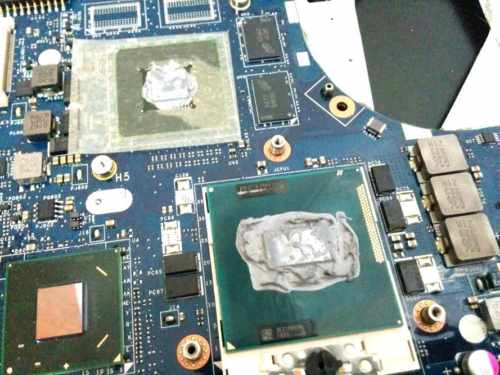
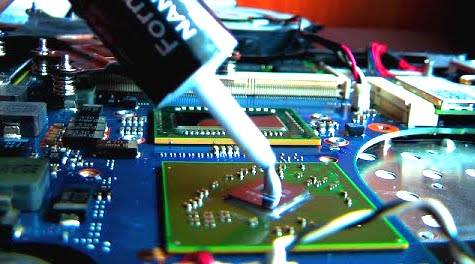
We remove the heatsink from the CPU and GPU (if laptop has dedicated graphics). We clean off old, dried thermal paste from both the processor surface and heatsink contact area using isopropyl alcohol and lint-free cloths. We apply fresh, high-quality thermal paste in appropriate quantity (laptops require far less paste than desktops - approximately half a grain of rice). We ensure even contact between processor and heatsink when reassembling. For high-performance gaming laptops and workstations, we use premium thermal paste suitable for higher heat loads.
Step 5: Fan Inspection & Replacement (If Needed)
We inspect cooling fan condition - checking for worn bearings (noise, wobble, resistance when spinning), verifying fan motor operation, and assessing blade damage. If the fan is faulty (noisy bearing, motor failure, or damaged blades), we'll contact you with a quote for fan replacement. Fan costs vary by laptop model - common models typically cost £10-30 for the part, specialist or rare laptop fans may cost more. Fan replacement adds time to the service but is essential if the fan is failing.
Step 6: Reassembly & Temperature Testing
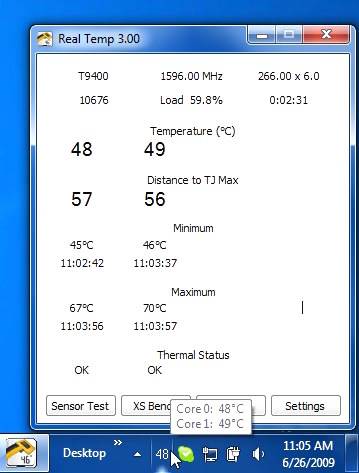
We reassemble your laptop carefully, ensuring all components are properly secured and all connections restored. We boot the laptop and run stress testing software to verify temperatures under load. We monitor CPU and GPU temperatures for 30-60 minutes to confirm cooling system is working effectively. Normal operating temperatures should be restored - typically 40-60°C idle, 70-85°C under load (varies by processor model and laptop design). We verify fan operation is quiet and efficient, and airflow from vents is strong.
Same-Day Service Available: Most standard laptops can be cleaned and tested within 1-2 hours same-day. However, some laptop models require more extensive disassembly and additional time. Gaming laptops with complex cooling systems (multiple fans, heatpipes, larger heatsinks) may require 2-3 hours. Contact Fixfactor at our London locations with your laptop model for accurate timeline estimate.
Preventive Maintenance - Every 12 Months Recommended:
Overheating repair isn't only for laptops already showing symptoms. Regular preventive cleaning every 12 months maintains optimal performance and prevents heat-related damage before it occurs.
Why annual cleaning matters: Dust accumulation is gradual and constant. Even in clean environments, laptops draw in dust and debris through cooling vents over time. Thermal paste degrades slowly - after 12-24 months, it begins losing effectiveness. Preventive cleaning before overheating symptoms appear prevents performance throttling, random shutdowns, and component damage from excessive heat. Laptops 2+ years old that have never been internally cleaned almost certainly need this service.
Add to any other repair: If your laptop is being repaired for another issue (screen replacement, battery replacement, storage upgrade, charging port repair), adding overheating cleaning service saves labour cost. The laptop is already disassembled for the primary repair, so cleaning the cooling system requires minimal additional time. We offer reduced pricing when cleaning is added to another repair service.
Supported Laptop Brands:
- Dell: Inspiron, XPS, Latitude, Precision, Alienware, Vostro
- HP: Pavilion, Envy, Spectre, EliteBook, ProBook, Omen, ZBook
- Lenovo: ThinkPad, IdeaPad, Yoga, Legion, ThinkBook
- Asus: ZenBook, VivoBook, ROG, TUF Gaming, ExpertBook
- Acer: Aspire, Swift, Predator, Nitro, Spin
- MSI: Gaming laptops, Creator series, Prestige, Modern
- Razer: Blade series (Blade 14, 15, 17, Blade Stealth)
- Apple: MacBook Air, MacBook Pro (all models)
- Microsoft Surface: Surface Laptop, Surface Book, Surface Pro
- Samsung: Galaxy Book, Notebook series
- LG: Gram series, UltraPC
- Toshiba, Fujitsu, Clevo, and other brands
No Warranty - Preventive Maintenance Service: Overheating cleaning is a preventive maintenance service (similar to a vehicle MOT or service). We clean the cooling system, replace thermal paste, and verify temperatures are normal after cleaning. However, we do not offer warranty on cleaning work as this is maintenance, not a component repair or replacement. The service fee is non-refundable once work is completed. If your laptop continues to overheat after professional cleaning and thermal paste replacement, this may indicate a hardware fault requiring repair - such as fan motor failure (requiring fan replacement), damaged heatpipe (requiring cooling system replacement), or motherboard issue (requiring separate diagnostics and repair). We'll advise you honestly if additional repairs are needed beyond cleaning.
What to Expect After Cleaning Service:
After professional cooling system cleaning and thermal paste replacement, you can expect: significantly lower operating temperatures (typically 15-25°C cooler than before cleaning), quieter fan operation (fan doesn't need to run at maximum speed constantly), restored performance (no throttling due to overheating), elimination of random shutdowns caused by thermal protection, laptop case no longer uncomfortably hot to touch, and strong airflow from exhaust vents (previously blocked by dust).
These improvements are immediate and noticeable after cleaning service is completed.
Additional Services During Overheating Repair:
With your laptop already disassembled for cooling system cleaning, consider these additional services at reduced labour cost:
- Battery replacement: Restore power performance and battery life while device is already open. Particularly worthwhile if battery is showing "Service Battery" warnings or significantly degraded capacity.
- RAM upgrade: Add more memory if your laptop supports RAM upgrades. See our RAM upgrade service for details.
- Storage upgrade: Increase storage capacity or upgrade from HDD to SSD for dramatically improved performance. See our storage upgrade service for details.
These services cost less when performed during overheating cleaning since the laptop is already disassembled, saving you labour time on future repairs.
Common Questions:
Q: How long does overheating cleaning take?
A: Most standard laptops can be cleaned and tested within 1-2 hours same-day. Gaming laptops with complex cooling systems may require 2-3 hours. Ultra-thin laptops with difficult disassembly may take longer due to careful access requirements. We'll provide timeline estimate based on your specific laptop model when you book.
Q: Will my data be safe during cleaning?
A: Overheating cleaning doesn't involve your storage drive or software directly. We never intentionally access or delete customer data. However, we cannot guarantee data safety during any hardware service. We always recommend backing up important files before any repair using Windows Backup, cloud storage, or external drive.
Q: How often should I have my laptop cleaned?
A: We recommend professional internal cleaning every 12 months for optimal performance and longevity. Laptops used in dusty environments (workshops, construction sites, pet-heavy homes) may benefit from more frequent cleaning every 6-9 months. If your laptop is 2+ years old and has never been internally cleaned, it definitely needs this service now.
Q: What if my laptop still overheats after cleaning?
A: If temperatures remain high after professional cleaning and thermal paste replacement, this indicates a hardware fault beyond dust/paste issues. Common causes include: fan motor failure (fan spins slowly or not at all - requires fan replacement), damaged or kinked heatpipe (cooling system physically damaged - requires cooling assembly replacement), motherboard voltage regulation issue (requires motherboard repair), or blocked/restricted airflow due to case damage. We'll diagnose the issue and advise what repair is needed. The cleaning service fee is non-refundable as we've performed the cleaning work, but we'll explain what additional repair is required.
Q: Do you replace the fan if it's faulty?
A: Yes, if we find the cooling fan is faulty during inspection (worn bearing, motor failure, damaged blades), we'll contact you with a quote for fan replacement. Fan replacement is a separate cost from the cleaning service. Most laptop fans cost £10-30 for the part depending on model, plus additional labour time for installation. We'll always get your approval before ordering or replacing the fan.
Q: What if you find liquid damage during cleaning?
A: During disassembly, we sometimes discover evidence of previous liquid damage - corrosion on internal components, dried liquid residue, or corroded connectors. If we find liquid damage, we'll take photos and inform you immediately. Liquid damage may require professional cleaning (separate liquid damage cleaning service) before the laptop can operate reliably. The overheating cleaning fee is non-refundable even if liquid damage prevents us completing the service, as we've performed diagnostics and disassembly work. We'll advise you honestly what's needed to address the liquid damage.
Q: Why do gaming laptops cost more to clean?
A: Gaming laptops have more complex cooling systems - often with dual fans, larger heatsinks, multiple heatpipes, and separate CPU/GPU cooling loops. Cleaning all these components takes longer than single-fan standard laptops. Gaming laptops also run hotter and benefit from premium thermal paste (higher thermal conductivity for better heat transfer under sustained load). The higher price reflects additional labour time and premium thermal paste cost.
Q: Can I watch while you clean my laptop?
A: We perform repairs at our London workshop locations. For security, efficiency, and insurance reasons, we don't allow customers in the workshop area during repair work. However, we're happy to explain the entire cleaning process before we start, show you photos of particularly dirty cooling systems if you're interested, and demonstrate the temperature improvements after cleaning is completed.
Q: Do you offer any warranty on cleaning work?
A: No, overheating cleaning is a preventive maintenance service (not a component repair), so no warranty is offered. We clean the cooling system and replace thermal paste, but we cannot warranty against future dust accumulation or thermal paste degradation over time. The service fee is non-refundable once cleaning is completed. If hardware faults are discovered (faulty fan, damaged heatpipe), those would be separate repairs with their own warranty terms.
Q: Is it worth cleaning a very old laptop (5-10+ years)?
A: It depends on the laptop's overall condition and your usage needs. If the laptop otherwise meets your needs (performance, battery life, software compatibility), cleaning can significantly improve cooling and extend its usable life. However, if the laptop is already struggling with performance, has other failing components (bad battery, failing drive), or doesn't meet your current needs, investing in cleaning may not be economically sensible compared to laptop replacement. We'll give you honest advice based on your laptop's condition during assessment.
Q: Should I add cleaning to another repair I'm having done?
A: Yes, if your laptop is being repaired for another issue and it's 12+ months since last cleaning (or never cleaned), definitely add overheating cleaning service. Since the laptop is already disassembled for the primary repair, cleaning the cooling system adds minimal time and we offer reduced pricing for combined services. This saves you labour cost compared to bringing the laptop back separately for cleaning later.
Q: What type of thermal paste do you use?
A: We use high-quality thermal paste appropriate for laptop applications - thermal compounds specifically designed for the thin application layer required in laptops (different from desktop thermal paste). For standard laptops, we use reliable mid-range thermal paste with good thermal conductivity. For gaming laptops and high-performance workstations, we use premium thermal paste with higher thermal conductivity to handle sustained heat loads. All thermal pastes we use are non-conductive and safe for laptop applications.
Diagnostics Available:
Not sure if overheating is your laptop's problem? Book our professional diagnostic service. We'll run temperature monitoring software, stress testing, and hardware diagnostics to verify whether overheating is the issue or if your laptop's problems stem from other causes (failing drive, insufficient RAM, malware, graphics card fault, motherboard issue). Sometimes performance problems that seem like overheating are actually caused by other issues - we'll give you honest assessment and recommend appropriate solution.
Important: Liquid Damage Discovery & Service Terms
During cooling system cleaning, we sometimes discover evidence of previous liquid damage (spills, water exposure, moisture) that wasn't mentioned when booking. If we find liquid damage during disassembly:
- We'll document it: Take photos of corrosion, liquid residue, or damaged components
- We'll inform you immediately: Contact you to explain what we found and what it means
- Additional service may be required: Liquid damage cleaning (separate service with different pricing) may be needed before laptop can operate reliably
- Fee is non-refundable: Even if liquid damage prevents us completing the overheating cleaning service, the service fee is non-refundable as we've performed diagnostics, disassembly, and assessment work
If your laptop has additional problems beyond overheating, please mention when booking:
- Liquid damage history: Any spills, water exposure, or moisture damage (even if it was dried/cleaned)
- Physical damage: Drops, impacts, cracked case, or damaged components
- Other known faults: Battery problems, charging issues, screen damage, keyboard faults, random shutdowns (not thermal-related)
Disclosing additional damage when booking allows us to provide accurate assessment and pricing for all work needed, rather than discovering issues mid-service.
Booking Your Laptop Overheating Cleaning:
If you want to send your laptop to us, select this service and complete checkout for mail-in service. If you prefer to drop off in person, book an appointment at one of our London locations. Have questions about your specific laptop model or service? Call us on 020 8543 7088.
