

Microsoldering & Motherboard Repairs In London
Component-level motherboard repairs when replacing parts isn’t the answer. ‘Unrepairable’ usually means nobody looked under a microscope. We do.

The Parts We Replace Are This Small
Board-level repair means fitting and soldering components you can barely see. The smallest part we replace is a 0201 - six tenths of a millimetre long.
At the 45× magnification we work at, that 0201 looks about as wide as a £2 coin.
- Grain of rice ≈ 6 mm
- Sesame seed ≈ 3 mm
- 0402 resistor 1.0 × 0.5 mm
- 0201 resistor 0.6 × 0.3 mm
- BGA solder ball 0.3 mm
Why Repair the Motherboard?
When manufacturers quote a full board replacement, we fix the actual failed component instead.
Usually Just One Failed Part
A ‘dead’ board has usually lost a single tiny component. We find it under the microscope and replace that part - the rest of the board is fine.
Storage Stays Where It Is
Replacing a whole board means moving your storage across, or losing what is on it. Component repair leaves it in place - and when the contents are what matter most, there is professional data recovery.
A Fraction of the Cost
Fixing the failed component typically costs far less than the full board replacement manufacturers suggest.
Less Electronic Waste
One repaired board saves the materials and energy of manufacturing a new device - repair is the greener option.
Motherboard Components We Repair
Select a component to see what fails, how we repair it, and what to expect.
Click a part of the board to read what fails there and how it is repaired. Diagram, not to scale.

Power Management IC Repairs
The heart of your device’s power system. When these fail, nothing works - and microsoldering is often the only way to replace them.
Common Power IC Failures
- CD3217 (MacBook USB-C) - won’t charge after a wrong adapter
- Tristar / Hydra (iPhone) - bootloop, no charging detection
- ISL9239 (laptop charging) - battery not recognised
- TPS51980A (power delivery) - random shutdowns
- Board-level fix
- No wipe, no reflash
- 6-month warranty

CPU & Chipset BGA Reballing
Heat cycles crack solder joints under processors. We remove, reball, and reinstall with precision.
BGA Chips We Service
- Intel PCH - platform controller hub failures
- AMD chipsets - system instability issues
- Apple T2 - security chip repair and restoration
- Qualcomm / MediaTek - phone processor repairs
BGA Reballing Process
- Thermal profiling and preheating
- Chip removal under controlled heat
- Old solder cleaning and pad preparation
- Stencil alignment and solder paste application
- Ball formation and chip replacement
- Microscope inspection and functional testing

Memory & Storage - Repair and Upgrade
From soldered RAM to phone storage chips - we repair, replace, and upgrade components others call “unrepairable.”
Memory & Storage Services
- LPDDR4/5 RAM - MacBook and ultrabook memory repair
- eMMC / UFS - phone storage replacement
- SSD controller - data recovery and repair
- NAND flash - direct chip transplant
- RAM / storage upgrades - soldered memory and storage capacity upgrades
We also upgrade soldered RAM and storage on laptops and phones. We’ll quote you upfront so you can decide whether the upgrade makes sense for your device. Donor board library available for rare configurations.

GPU Reballing & Thermal Solutions
Graphics chips run hot. Solder joints fail. We restore full contact and upgrade the cooling.
GPU Services
- Gaming laptop GPUs - dedicated NVIDIA and AMD chips
- MacBook dGPU - AMD Radeon Pro series
- Desktop cards - high-end GPU revival
- Thermal optimisation - liquid metal and full repaste
What Overheating Actually Does
- Heat builds up - a poor solder contact or a tired heat path traps it against the chip.
- Performance is cut - the chip throttles itself to bring the temperature back down, so the machine stutters.
- It shuts down - if throttling is not enough, the machine powers off to protect the chip.
Restoring the solder contact and rebuilding the heat path removes the reason it was climbing in the first place.

Liquid Damage Recovery
Water, coffee, wine - we’ve seen it all. Quick action saves devices. Learn more about our liquid damage repair service.
Our 5-Step Protocol
- Emergency teardown - complete disassembly to stop the damage spreading
- Ultrasonic cleaning - remove all contamination
- Microscopic inspection - identify corroded components
- Microsoldering repair - replace what corrosion destroyed
- Protective coating - guard against future damage
Timing matters. Brought in within the first couple of days, most liquid-damaged boards are recoverable. After a week, corrosion has usually spread and the odds drop sharply - so don’t wait, and don’t power it on.

Port & Connector Reconstruction
Ripped charging ports, damaged display connectors - we rebuild them from PCB level up.
Port Repairs
- USB-C / Thunderbolt - full trace reconstruction
- HDMI / DisplayPort - pin-level repair
- Audio jacks - 3.5mm port replacement
- FPC connectors - display and keyboard ribbons
Beyond simple replacement. When ports are torn from boards, we rebuild PCB traces, recreate pad connections, and reinforce mounting points so the repair lasts.

BIOS & Firmware Recovery
Failed updates, corrupted firmware, forgotten passwords - we restore boot capability.
BIOS Services
- BIOS recovery - failed update restoration
- ME region repair - Intel Management Engine
- Password removal - BIOS/UEFI unlock for verified owners
- Chip programming - direct SPI flash
Professional tools. Dedicated programmers, SOIC clips, and custom firmware extraction - read, repair, and rewrite at chip level.

Capacitor & VRM Repairs
Individual component failures cause system instability. We replace them at component level.
Component Repairs
- Blown capacitors - polymer and ceramic replacement
- MOSFETs - power stage failures
- Voltage regulators - multi-phase VRM
- Inductors - coil whine solutions
Miniature work. Down to 0201-size parts (0.6mm × 0.3mm) - smaller than a sesame seed.
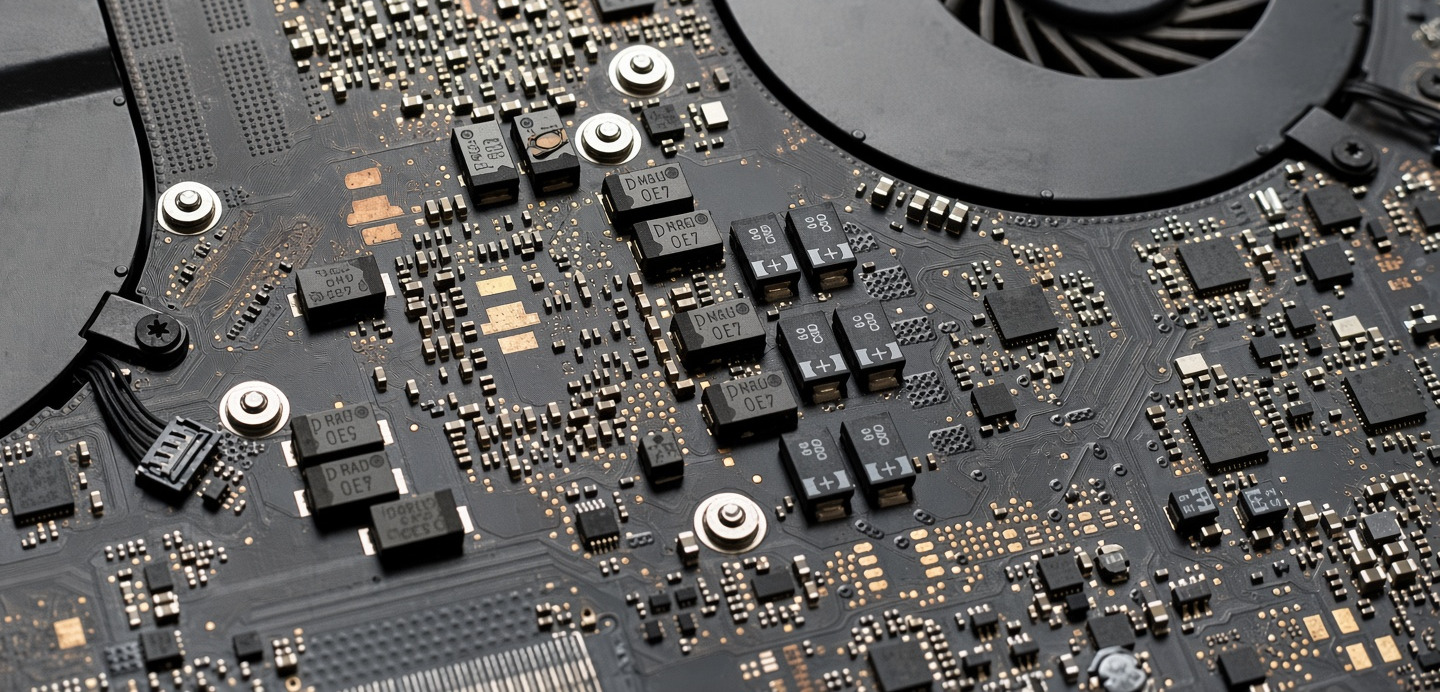
This is the size everything above happens at.
Chips, pads and passives on a laptop mainboard, photographed at the bench. The parts we replace sit between these.
What Happens to Your Board
Six stages, and stage three is yours.
-
It Reaches the Bench
Walk into Wimbledon - or book a slot, or post it. Boards come and go by courier every week.
-
The Board Is Assessed
Opened, inspected under the microscope, measured stage by stage. £39, or £49 if someone has already been inside. One to three working days.
-
You Get the Price, and You Decide
Which part failed, what it costs, and whether we would spend it. Nothing starts until you say yes - and the £39 comes off the repair.
-
The Repair Is Done
Under the microscope, hot air or iron depending on the part. Two to four hours of bench time.
-
It Is Tested Before It Leaves
Inspected again, then run under load and checked on the fault that brought it in.
-
It Goes Back to You
With six months on the work and the findings written down.
If the board cannot be saved, you hear it at stage three, not after the money is spent - and we can usually still get the data off. See data recovery.
The Stacked-Board Challenge
Since the iPhone X, most iPhones carry their electronics on two boards soldered face to face - only the XR and SE kept a single board. Huawei’s flagships and Samsung’s Ultra and folding models are built the same way.
The components sealed between the layers cannot be reached, or even measured, until the stack is desoldered apart - hours of work, with real risk to the board, before diagnosis has begun. So on these phones:
- Cleaning and visible faultsLiquid damage, charging and audio ICs, connectors, damaged parts on the reachable layer - repaired as normal, with the six-month warranty.
- Dead board, no visible causeA data recovery job, not an hourly repair. We split the stack to get your files back - budget from £500. You pay for the data, not the phone; if nothing can be recovered, only the assessment fee is spent.
- Laptops and everything elseSingle boards, every component in reach - board repair as described on this page.
Charging, audio or liquid-damage fault? Book a phone micro-soldering repair. Dead phone with photos on it? Start at phone data recovery.
12 Years at the Microscope
What board-level repair takes - and what we have built to do it properly.
Professional Equipment
- AmScope 7x-45x trinocular microscope
- Jovy RE-8500 BGA rework station
- FLIR thermal imaging camera
- Rigol DS1054Z oscilloscope
- JBC NASE-2C soldering station
Trained for Board Work
- Technicians with years of board-level experience
- Continuous upskilling in new repair techniques
- Board schematic analysis
- Thermal and current-based fault tracing
Component Inventory
- Common ICs and passives in stock
- Donor board library
- Genuine IC suppliers
- Same-day parts sourcing when possible
Board-Level Repairs We See Most
Typical board-level jobs, written up the way we record them. Outcomes and timelines are representative.
Phones
-
Went in a Drink, Then Stopped Charging
Never powered up wet. Cleaned, then the corroded parts replaced on the board.
Charging restored · storage untouched
-
Boot Loop, With Everything Still on It
Storage reached at board level, rather than wiping the phone and starting again.
Contents recovered
-
Charging Only Worked If You Held the Cable
The port is soldered on, so it came off under the microscope. New battery while it was open.
Charges normally · one visit
-
Nothing After a Spill
Liquid had bridged the power section. Cleaned, then the rails traced stage by stage.
Back in use
Laptops & 2-In-1s
-
Soup Went Into the Keyboard
Clean first, then component-level repair everywhere the soup had reached.
Board saved · storage untouched
-
USB-C Ports Had Stopped Working
Ports replaced on the board, instead of the whole new board this fault usually gets quoted.
Original board kept
-
Random Black Screens That Nothing Explained
The owner had ruled out RAM, battery, charger and paste. What was left was the board.
Cause found
-
Posted in After a Spill, From Outside London
Assessed before any power went near it, cleaned, then returned by courier.
Returned · no visit needed
Desktops & Consoles
-
Powers up, but Nothing Reaches the Screen
Fans and lights ran, so not the power supply. Traced the failing stage before buying anything.
Diagnosed before any parts were bought
-
Would Not Turn On
Everything sits on one board, so there is nothing to swap out and test. Diagnosed directly.
Fault located
-
No Power at All
Nothing reaching the power rails. Traced under the microscope instead of replacing the board.
Repaired, not replaced
-
Would Not Start After a Knock
Impact travels through the board, not just the shell. Checked under magnification for cracked joints.
Fault located
Drones & Drives
-
Camera Gimbal Stopped Holding Steady
Gimbal faults usually sit in the control board, not the motors. Checked there first.
Diagnosed without swapping the gimbal
-
Drive Stopped Spinning Up
No power was reaching it, and the fault sat on its own small board. The sealed part stayed sealed.
Powered up again
Recognise your device in any of these? Tell us what it is doing. Board faults have to be found before they can be priced, so we start with an assessment and quote the repair once we know what it actually needs. Get a quote
Motherboard Repair Questions
What people ask before a board goes on the bench.
How do I know if my device needs motherboard repair?
When the obvious part has already been replaced and the fault is still there, it is on the board. The signs we see most:
- No response at all, on a battery you know is charged
- Shuts down or restarts on its own
- Still will not charge after the port or the battery was changed
- Gets hot doing nothing
- Somebody else has already told you it is unrepairable
You cannot tell from the outside which component failed, and neither can we - that is what the assessment is for. £39, or £49 if the device has been opened elsewhere, and it comes off the repair if you go ahead.
Do you work on all brands?
Yes - Apple, Samsung, Dell, HP, Lenovo, Asus, Acer, MSI, Microsoft, Google and the rest, across phones, laptops, tablets, desktops, consoles, drones and external drives.
Board-level work does not depend on the badge on the case. It depends on the components on the board and on whether the schematic and the replacement parts can be sourced, which is a question we answer during the assessment. If your device is unusual, send us a photograph of the board first and we will tell you whether it is work we take.
Can you fix an iPhone that is completely dead?
It depends on where the fault sits. If the cause is visible or reachable - liquid damage, a failed charging or audio IC, a damaged connector, a burnt capacitor - yes, that is routine board work and carries our standard warranty.
On the stacked-board models - iPhone X, XS, 11 and everything from the 12 onwards, except the XR and SE - a dead board with no visible cause is different: finding the fault means desoldering the two board layers apart, hours of work with real risk to the board. We do not sell that as a repair. We take it on as data recovery - realistic budget from £500, paid for your files rather than the phone, and if nothing can be recovered you pay nothing beyond the assessment fee.
Can you repair liquid-damaged devices?
Yes, and how quickly it reaches us matters more than how much liquid went in. Boards on the bench within the first day or two are usually recoverable; corrosion keeps spreading through tracks and pads for as long as the board is left.
The board is cleaned ultrasonically, the corroded components are replaced, and a protective coating goes back on before it is reassembled. Older liquid damage is often still worth assessing. More on the liquid damage page.
How long does a motherboard repair take?
Usually one to five working days from the moment we have the device, and sometimes longer.
The assessment is one to three of those days. The soldering itself is often only a few hours - the rest is the queue, parts that occasionally have to be ordered, and the testing, because a board that works for five minutes is not a repair. A straightforward power fault can be finished in a couple of days; a multi-rail short after liquid damage can take a week or more. You get a real timeframe with your quote and we agree it with you before anything starts. If the job is urgent, say so and it can be moved up the queue.
Is my data safe during repair?
We never delete anything deliberately and we do not open your files - but we cannot take responsibility for your data, and no repair shop honestly can.
Where the storage can be removed, it comes out before the board goes under the microscope and we test on a drive of our own, so yours is not in the machine while we work. Where it is soldered to the board - most phones, many recent laptops - it stays where it is and we work around it. There we have no control over it, and often no way of telling whether the data was still intact when the device arrived: a board fault is quite often the storage failing in the first place.
So back up while the device still powers on, if it does. And if the contents matter more than the device, say so before we start - that changes how we approach the board, and it may be a data recovery job rather than a repair.
What if the board cannot be repaired?
You pay the assessment fee and nothing else. No repair is started until you have approved a fixed price, so there is no bill for work you did not agree to.
We tell you what we found and why we are not going ahead - whether the damage is genuinely beyond recovery, or the repair would cost more than the device is worth. Both happen, and we say which one it is. A board that cannot be brought back can usually still be read, so the data is not automatically lost with it.
Do you provide a warranty?
Yes - six months on the work, and six to twelve months on any part we fit, depending on the supplier.
If the same fault comes back within that period we repair it again at no charge. It does not cover a new, unrelated fault, fresh physical damage, or liquid getting into the device after the repair. Full terms are on the warranty page.
One exception: board work done to recover data from a stacked phone board. There the deliverable is your files, not the handset, so the handset itself carries no warranty. You approve the work on that basis.
How Pricing Works
How the cost is built up, and when you get a firm price.
Cost Structure
Professional diagnostics: £39 standard, £49 if previously serviced elsewhere. Takes 1-3 working days. Non-refundable, but credited towards the total repair cost if you proceed.
Experienced microsoldering technicians. Most repairs take 2-4 hours. Rush service available. Stacked iPhone boards are the exception - they are taken on as data recovery, not hourly repair.
Genuine parts from authorised suppliers, backed by our own stock and donor board library.
6 months on labour; parts carry 6-12 months depending on the supplier. Same fault returns - we fix it free.
What Affects the Price
- Fault complexity A blown capacitor is a quick job; a multi-rail short after liquid damage takes hours of tracing.
- Component availability Common ICs are in stock; rare chips may need sourcing or a donor board.
- Device access Some boards take minutes to reach, others need a full teardown before work can start.
- Turnaround Standard service is the best value; rush service for critical repairs costs more.
The assessment tells us what the board actually needs. Only then can we put a firm price on it - and no repair begins until you have that price and have agreed to it. Tell us what the device is doing and we will say what the assessment will involve.
Need Motherboard Repair in London?
We find the fault first, then price the repair. Nothing starts until you have approved that price.
- Expert Analysis
- 6-Month Warranty
- Clear Timelines
- Priced After Diagnosis
- 1000+ reviews
- 220k+ devices repaired
- Data preserved