

Microsoft Surface Repair
Find your model.
Choose your Microsoft Surface model
Surface Pro 2014-2024
 Surface Pro 11
 Surface Pro 10
 Surface Pro 9





Surface Laptop 2018-2023
 Surface Laptop 5
 Surface Laptop 4
 Surface Laptop 3
 Surface Laptop 2
Surface Book 2015-2020


Other Surface
Other SurfaceNo model matches that. Try just the number - or ask us for a quote and we’ll identify it for you.
Not sure which one you have?
The model number is the thing to find, because every Surface generation uses a different screen and a different battery. On a Surface Pro or Go it is printed under the kickstand; on a Laptop or Book it is on the underside. Or open Settings › System › About. If you cannot get it to switch on, send us a photo of the back and we will identify it.
Most Common Surface Repairs
Screen, battery, charging, kickstand and storage repairs. Access and screen risk depend on the model and the repair - we explain both before you book.
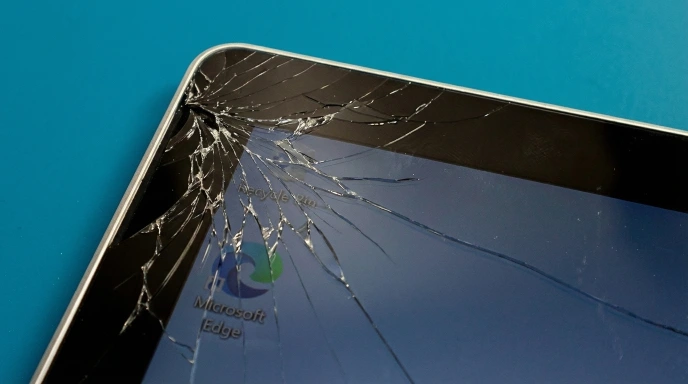
Screen Replacement
Cracked glass, dead touch, a panel that has stopped lighting. Surface displays are bonded assemblies - glass, digitiser and LCD in one piece - so the whole unit is replaced, and the digitiser is the part that decides whether your pen still works properly afterwards. Every generation takes a different panel, which is why we need the model number before ordering.
2-4 hours* About Screen RepairsBattery Replacement
Runtime that has halved, shutdowns with charge still showing, or a cell that has swollen and started lifting the glass. Swelling is the Surface fault we see most and the one people leave longest - caught early it is a battery. Left running, it becomes a battery and a screen.
3-4 hours* About Battery ProblemsCharging Port & Surface Connect
A magnetic Surface Connect port that has stopped holding, or USB-C charging that has died. Cleaned and tested first, then repaired at the board - on these devices the fault is as often the charging circuit as the connector, and those are two different jobs at two different prices.
2-3 hours* About Charging FaultsKickstand & Hinge
A kickstand that will not hold its angle, sits proud on one side, or has come loose at the pivot. The mechanism itself is repairable; the catch is that it lives under the display, so this is one of the jobs where the screen has to come off first.
Quoted after diagnosis*Storage, SSD & Data Recovery
From the Surface Pro X and Pro 7+ onwards, and on Surface Laptop 3 and later, the drive is a removable M.2 2230 - replaceable, and upgradeable. On a Pro 7 or earlier it is soldered to the board, so a failed drive is a data recovery job rather than a swap. Either way we can usually get the data off.
Quoted after diagnosis* About SSD UpgradesLiquid Damage & Board-Level Repair
Ultrasonic cleaning of the board, then component-level work on whatever the liquid reached - power rails, shorts, a device that will not post. That is motherboard repair, not a parts swap. Bring it in unpowered; every hour it spends switched on costs you options.
1-3 working days** About Liquid DamageSymptoms pointing in several directions? How Diagnostics Works
Times assume the part is on the bench. We order per repair rather than hold stock, because every Surface generation takes a different screen - so booking ahead is what makes same-day possible. Tell us the model number before you travel.
Liquid damage is quoted after the board has been cleaned and read, not before. If corrosion has reached the charging circuit or the power rails, the work runs longer - you hear that at the point we know, not at the counter.
What Decides a Surface Repair
Four things worth knowing before you choose between us and a manufacturer replacement.
Microsoft Surface Repair Specialist in London
Surface Pro, Go, Laptop and Book use different designs. The exact model and the failed component decide how we open it.
Many internal repairs on Surface Pro and Go tablets require the bonded display to be lifted. That does not apply to every Surface job: some models have an SSD access door, while Surface Laptop models use a different disassembly route.
That is worth knowing before you compare prices, because it is also why the two obvious routes - a manufacturer replacement and an independent repair - are not the same product at two prices. They are different things.

Four things you’ll hear from us first
- What is actually wrong. Not whichever repair is quickest to sell you - a Surface Connect port and the charging circuit behind it fail the same way and cost differently.
- What the part costs. Surface parts are expensive and we will not pretend otherwise. You hear the figure before anything is ordered.
- Who carries the screen risk. On some repairs it is already inside the price we quote you. On most it is not. You hear which before we open anything.
- Whether it is worth it. On an older Pro the panel can cost more than the device is worth today. We say so, and people still go ahead more often than you would expect - usually because what they want back is what is on it.
When a Surface Repair Requires Screen Removal
On many Surface Pro and Go models, battery and motherboard work begins by removing the bonded display. A removable SSD behind its own access door is different. Surface Laptop repairs also follow a model-specific route, rather than the tablet procedure.
Microsoft publishes model-specific service guides. We check the access route for your model and explain any display-removal risk before work starts. The screen-risk terms below apply when that repair requires the display to be lifted.
So there is a real risk - small on some models, meaningful on the older Pros - that a display which was intact when you handed the device over cracks while it is being lifted. Controlled heat, proper separation tools and a slow hand keep that rare. Rare is not never, and it is better said in advance than explained afterwards. If the screen breaks while we are opening your Surface, the replacement screen is chargeable. On some repairs - typically on older models, where the panel is inexpensive - we carry that risk ourselves and the screen is already inside the price you were quoted. Which of the two applies to your device is something you hear before we open it, with the actual figure attached.
And you are not committed either way. If it happens and you would rather keep the money, we finish the repair you came in for and hand the Surface back with the cracked screen - that is your call to make, not ours. If you would rather not take the risk at all, say so when you hear the numbers and we stop there: you pay for any part already ordered plus the £39 diagnostics, and nothing has been opened. What will not happen is a bill arriving that you had not heard about first.
Why People Bring Us a Surface Instead of Sending It to Microsoft
Microsoft’s out-of-warranty route is, for most faults, not a repair. Its own support page is plain about it: a device that is out of warranty, damaged or has a cracked screen “may be replaced with a refurbished device”. You post yours in, a reconditioned unit of the same model comes back. The same page is equally plain about your files - back them up if you can, because they will not be able to recover them for you.
For a lot of people that is a perfectly good answer. For anyone whose work is on the device, or who would rather keep the machine they set up, it is not a repair at all.
We will be straight about where that route beats us. On price we often cannot win. A display assembly for a current Surface Pro is expensive whoever fits it, and there are faults where a manufacturer replacement is simply the cheaper answer. When yours is one of them we say so rather than quoting you anyway.
Where we are better is everything else. Speed - most screen and battery work is finished in hours, or a couple of days if the part has to come in, rather than a shipping cycle in each direction. Your device stays yours - we repair the Surface you brought in, we never wipe it deliberately, and we test only the function we repaired. And we take on faults a swap programme has no answer to: a failed power rail, a board corroded after a spill, a charging circuit that has gone rather than a port that wore out, data pulled off a soldered drive in a Surface that will not boot. A replacement answers all of them the same way: it keeps your device and sends you a different one.
The Model Number Decides the Part
Surfaces that look identical across a desk take different screens, different batteries and different connectors. A Surface Pro 5 and a Surface Pro 6 are both stamped 1796 and are not interchangeable in every part; the Pro 4 and Pro 5 use visibly different LCD cable connectors. Guessing the generation from the photograph in a listing is how the wrong panel gets ordered.
The number is under the kickstand on a Pro or a Go, and on the underside of a Laptop or a Book. Send it with your enquiry and the quote you get back is the real one. If the device will not switch on, a photograph of the back is enough - ask for a quote and we will read it for you.
Not on the grid above? The grid is what has a page here, not what we take. Surface RT, Surface 3, Studio and the models too new to have been written up all come through the workshop on the same two conditions as everything else: the part has to exist, and the price has to make sense to you. Not a Surface at all - see tablet repair for the rest of the range, or iPad repair if that is what you have.
Pick your model above to see repair options and pricing, or visit our Wimbledon workshop.
Rated by 1,000+ Customers
“They did not give up trying to fix my computer even though I thought it was impossible. Adam saw it as a challenge and fixed it at a reasonable cost.”
Microsoft Surface Repair FAQs
The questions people actually ask before booking a Surface in.
What happens if the screen cracks while you are opening my Surface?
You pay for it - unless yours is one of the repairs where we carry that risk and the screen is already inside the price you were quoted, which is usually the case on older models with inexpensive panels. You hear which of the two applies to your device, with the figure, before anything is opened. You can also decline the replacement: we finish the repair you came for and hand the Surface back with the cracked screen, if that is what you would rather. Or stop before we start, once you have heard the numbers - you would pay for any part already ordered plus the £39 diagnostics. Why opening one risks the screen at all.
Does Microsoft repair Surfaces, or replace them?
Both, depending. Microsoft has sold official Surface service parts through iFixit since late 2023 and publishes service guides, so the newer devices are genuinely serviceable. But its own out-of-warranty page says a damaged or cracked-screen Surface “may be replaced with a refurbished device” - you send yours, a reconditioned one comes back, and the same page warns that they cannot recover your data for you. We repair the device you brought in and do not wipe it. We are often not cheaper; we are usually faster, and we take on board-level faults a replacement programme does not address at all.
Can you repair a Surface kickstand?
Yes - a stand that will not hold its angle, sits proud on one side or has come loose at the pivot is a mechanical repair, not a reason to replace the device. The access route depends on the model and the damaged part. We explain whether screen removal is needed and which screen-risk terms apply before work starts. Quoted after diagnosis, because what is worn varies.
My Surface battery has swollen and lifted the screen. Is that repairable?
Usually, and it is worth acting quickly. A swollen cell has nowhere to expand except against the glass above it, so the screen lifts at an edge, the kickstand stops sitting flush and touch goes patchy over the bulge. Stop charging it, and stop using it if the glass has lifted. Caught early it is a battery replacement. Left running, it is a battery and a screen - and a swollen lithium cell under pressure is a fire risk, not just an expensive one.
Can you upgrade or replace the SSD?
On a Surface Pro X, a Pro 7+ or anything newer, and on Surface Laptop 3 and later, yes - the drive is a removable M.2 2230 and can be replaced or upgraded. On a Surface Pro 7 or earlier the storage is soldered to the board: nothing to swap, so a failing drive there is a data recovery job rather than an upgrade. Tell us the model and we will say which you have.
Will the pen still work properly after a screen replacement?
Yes, when the right panel goes in. Pen accuracy and pressure live in the digitiser layer, which on a Surface is bonded into the display assembly - so the pen behaves correctly if the assembly is the correct one for your exact model, and behaves oddly if it is not. It is one of the reasons we order against a model number rather than a description.
Is my data safe, and will you wipe the device?
We never delete customer data deliberately. Technicians test only the function that was repaired - display, touch, charging - and for that we usually need your passcode or a guest account. Back up to OneDrive or an external drive first if you can: loss during a repair is rare, but it is sensible before anything that involves opening a device, and it is not something we can be liable for.
How long does it take, and can I post it in?
Screen and battery work is typically 2-4 hours once the part is on the bench; board-level work takes longer and is quoted after diagnosis. One workshop: 136 Kingston Road, Wimbledon, London SW19 1LY, open Monday to Friday 9am-6pm and Saturday 9am-4pm. You do not have to be in London - post it in from anywhere in the UK, tracked and insured both ways, and it comes back the same way. Tell us the model and the fault before you send it so the part is on the bench when it lands. See how mail-in works.
How does the diagnostic fee work?
Diagnostics is £39, paid upfront - at the counter when you bring the tablet in, or online when you post it. Go ahead with the repair and the fee is credited in full, so the assessment effectively costs you nothing. If the tablet turns out to be beyond economical repair, the fee covers the work of finding that out.