

Steam Deck repairs
Stick drift, cracked screens, worn charging ports and noisy fans on the original LCD Steam Deck. Board-level work done in house, not sent away.
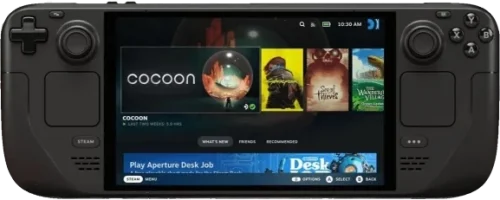
Repairs
Something is broken or worn out.
Cracked glass, a dead panel, or touch that has stopped responding on your Steam Deck.
What’s included
- Replacement part - no hidden extras
- Fitting & labour by in-house technicians
- Full function test before handover
- Up to 12-month warranty
- Diagnostic fee credited towards this repair
- Your data stays untouched
Charges only at an angle, charges intermittently, or has stopped charging. The USB-C port is soldered to the board, so it is a repair rather than a plug-in part.
What’s included
- Replacement part - no hidden extras
- Fitting & labour by in-house technicians
- Full function test before handover
- Up to 12-month warranty
- Diagnostic fee credited towards this repair
- Your data stays untouched
A fan that whines, rattles or has stopped spinning - and a handheld that gets hot and throttles because of it.
What’s included
- Replacement part - no hidden extras
- Fitting & labour by in-house technicians
- Full function test before handover
- Up to 12-month warranty
- Diagnostic fee credited towards this repair
- Your data stays untouched
When the fault is not obvious. We test the handheld, open it where needed and give you a written price to put it right.
What the assessment fee covers
- Full assessment by an in-house technician
- An honest verdict on what is wrong
- A firm price before any repair starts
- Fee credited towards the repair - you pay the balance of the quote
- No obligation to proceed
The most common Steam Deck job by a distance. A character that walks on its own, a stick that reads input you did not give it, or a trigger that no longer returns.
What’s included
- Replacement part - no hidden extras
- Fitting & labour by in-house technicians
- Full function test before handover
- Up to 12-month warranty
- Diagnostic fee credited towards this repair
- Your data stays untouched
Full details for Steam Deck Thumbstick & Trigger Drift Repair
Know the fault, but don’t see it listed? Describe it and we’ll price it from your description - free, no device needed. Not sure what’s wrong? That’s what the Diagnostics Service above is for.
A shelf of these in a studio or a games lounge? We service them in batches, with collection, return and a single invoice. Business repairs
What Is It Doing?
Start with the symptom - working out which part it is, is our job.

It moves on its own
Drift. The character walks with your thumbs off the sticks. It is wear in the module, and no recalibration fixes a worn part.
Charges only at an angle
The USB-C port is soldered to the board and wears out. Bring the charger too - sometimes it is the cable.
Cracked or blank screen
Dropped, or lines across the panel. The LCD comes off as an assembly, which keeps this well below what people fear.
Whining, rattling or hot
A small fan doing a lot of work in a tight case. Replaced, heatsink cleaned, compound renewed, tested under load.
A trigger stopped returning
The trigger and its module are the same repair as a drifting stick, on the same board.
Will not turn on at all
Could be the battery, the port, or the board. It gets tested rather than guessed at.
Touch has stopped working
Sometimes the digitiser under the glass rather than the panel itself, and that changes the price.
The SD card is not seen
Try another card first. If it is the reader, it sits close to the heat and it is a board repair.
Something got spilt on it
Do not power it on and do not charge it. Taken on assessment, not at a fixed price.
None of these?
Buttons, bumpers, shells, speakers, handhelds other shops turned away. Describe it and we will price it.
Which Steam Deck do you have?
Three LCD models shipped, and they differ in storage rather than in anything that changes a repair. The one thing worth knowing is which storage you have, because it decides whether an upgrade is worth doing at all.
The entry model, and the slowest. Its storage is soldered eMMC rather than an M.2 drive, so if the handheld feels sluggish that is the reason and not a fault.
What we see most on these
- Stick drift, the same as every other Deck
- Charging port wear
- Fan noise - the early fans were the loudest
The middle model with a proper M.2 drive inside. Mechanically identical to the others, so nothing about a repair changes.
What we see most on these
- Stick and trigger drift
- Cracked screens
- Charging port and fan
The top LCD model, with an anti-glare etched front. Worth saying out loud: the etched glass is a different part, and a replacement has to match it or the finish changes.
What we see most on these
- Cracked etched glass - matched on replacement
- Stick and trigger drift
- Charging port and fan
Not listed? We still repair it - tell us what you have.
Board-Level Repair, in Plain Terms
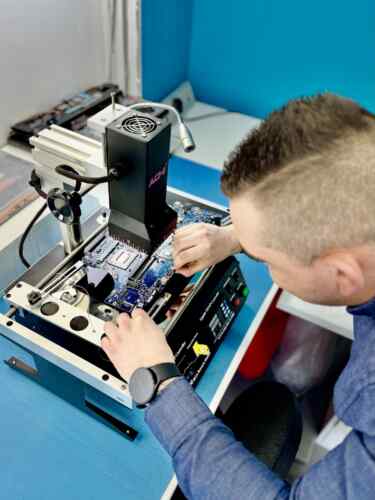
A handheld is a laptop that gets carried, dropped and charged every day, and almost everything that fails on one is soldered down. Valve publishes parts, which is more than most, but a port or a stick module still has to come off the board and go back under a microscope. That is ordinary work here.

You keep your own handheld
Your installed library and your saves stay on it, and it comes back as the machine you sent in.
You see the price first
Diagnostics is £39 and comes off the bill when the repair goes ahead. You get the fault, the price and the timescale before anything is opened.
Drift is a part, not a setting
The sticks and triggers are soldered to the controller boards. A worn module is replaced and recalibrated - no amount of recalibration on its own fixes a worn part.
Six months on board work
Board-level repairs carry a 6-month warranty. Run under sustained load with both sticks, both triggers and the touchscreen exercised before it goes back.
We diagnose before we quote, and quote before we touch anything. If the board is not worth repairing, we tell you that and why.
Drift is wear, not a setting
The first thing most people try is recalibrating in software, and it is worth five minutes because occasionally it is a dead zone that has drifted rather than a stick. But when the module itself is worn, no amount of calibration puts material back, and the drift returns within a day or two. The module is soldered to the controller board, so the fix is a replacement part and a recalibration afterwards - and it is the job we do most on this handheld.
The charging port is the second thing to go
A console under a television gets plugged in once. A handheld gets plugged in and pulled out every single day, often one-handed and at an angle, and the port is soldered flat to the board. The warning sign is a cable that has to be held just so. Left alone it goes from intermittent to dead, and if the pads lift on the way it stops being a port replacement and starts being a board repair.
Valve publishes parts. That is not the same as it being easy
Valve is better than most about spare parts and repair documentation, and that genuinely helps. What it does not change is that the port, the stick modules and the charging circuit are all soldered to the board in a case with no slack in it. Having the part is the easy half. The other half is hot air, a microscope and a steady bench - which is why these arrive here after a first attempt more often than any other device we take.
Charging Intermittently, or a Swollen Back? Stop Now
Two handheld faults get worse with every day of use, and one of them is a safety matter.
-
1
A Port That Needs Holding
If the cable has to sit at an angle, the port is already loose on the board. Every plug-in after that lifts the pads further, and lifted pads are a longer repair than a worn port.
-
2
A Case That No Longer Sits Flat
A back that bows, or triggers that suddenly bind, can be a swelling battery. Stop charging it, stop using it, and do not put it in a bag.
-
3
Bring the Whole Set
Handheld, charger and cable, the dock if you have one, and a game installed. We test on your own kit - and if the screen is cracked, do not peel anything off it first.
Neither fault fixes itself and neither stays the same size. If it still charges some of the time, that is the cheap moment to bring it in, not after it stops entirely.
Ways to Use Our Service
Two ways to get your Steam Deck repaired - bring it to Wimbledon, or post it from anywhere in the UK.
What We Do, How, and Why Us
The four things that actually break on this handheld: worn stick and trigger modules, the soldered USB-C port, cracked and dead screens, and fans that whine before they stop. All of it soldered work rather than clip-in parts, done on the same bench as laptop mainboards. One workshop in Wimbledon, and post-in from anywhere in the UK.
Diagnosis comes before a price, always. A handheld that will not charge can be the cable, the port, the battery or the board, and those are four different bills - so it gets tested rather than guessed at. Nothing is ordered and nothing is opened beyond the assessment until you have said yes to a number.
We also say no. If the fault is a setting, a cable or a card, we will tell you and charge you nothing for the sentence. And when a repair costs more than the handheld is worth to you, you get that number rather than a quiet invoice.

What Customers Say
Every repair carries a warranty. These are unedited reviews left on Google and Trustpilot.
Good to Know
The questions we are asked most about Steam Deck repairs.
Not answered here? Ask us - we reply the same working day.
My Steam Deck has stick drift. Can it be repaired?
Yes, and it is the most common job we see on this handheld. The stick module is soldered to the controller board, so it is replaced on the bench and recalibrated afterwards. Software calibration is worth trying first and takes five minutes, but it does not fix a worn part.
It only charges when I hold the cable at an angle. Is that the port?
Almost certainly, though bring the charger with it - a fair share of these turn out to be a failing cable, and we would rather tell you that than replace a port that was fine. If it is the port, it is soldered to the board and comes off under a microscope.
How long does a repair take?
Stick modules, charging ports and fans are usually one to two working days with the part in stock. Screens depend on the panel arriving. Anything investigative - a handheld that will not power on, or liquid damage - needs two to three working days before there is a quote worth giving.
Is it worth repairing rather than replacing?
For drift, a port or a fan, comfortably - those are well under what a replacement handheld costs. A screen is a bigger number and a fair question, so you get the price before you commit and we will say if we think it is close.
My SD card has stopped being detected. Is the reader dead?
Try a different card first, because cards fail more often than readers do. If a known good card is not seen either, the reader sits close to the warm side of the board and it is a component-level repair rather than a part you can slot in.
The back of the case is bowing. Is that serious?
Treat it as serious. A case that no longer sits flat, or triggers that suddenly bind, can be a swelling battery. Stop charging it, stop using it, do not put it in a bag, and bring it in - this is the one fault where waiting is not a neutral choice.
Can I post it to you?
Yes, from anywhere in the UK. Send the handheld with its charger and cable, and the dock if you have one - we test on your own kit, and chargers and cables fail more often than people expect. Pack it in something rigid and send it tracked. Everything comes back with it once it has been repaired and tested.