

Lenovo laptop repairs
Screens, batteries, charging ports and board-level faults on every Lenovo - ThinkPad, ThinkBook, IdeaPad, Yoga, and Legion and LOQ gaming machines.

Repairs
Something is broken or worn out.
Professional laptop screen repair and replacement service in London. Fix cracked screens, dead pixels, display failures, and backlight issues for all laptop brands. Expert LCD panel replacement with quality testing. Same-day service available with pre-order or 1-3 days turnaround.
Keys sticking, repeating or not responding? We check the fault and confirm the keyboard replacement needed for your model.
Professional laptop battery replacement in London for all brands. Same-day service available when batteries are pre-ordered. Battery draining fast, unexpected shutdowns, swollen battery? High-quality replacements with 12-month warranty.
Professional laptop charging port repair in London - loose ports, broken pins and laptops that only charge at an angle, across all brands. We check the cause first and confirm the repair and timing for your model before you book.
Professional laptop and desktop PC storage replacement service in London. Replace faulty hard drives or upgrade to faster SSD/NVMe storage. Fix boot failures, no operating system errors, clicking drives, and slow performance. Next-day service typical.
Full details for Laptop Hard Drive / SSD Replacement & Upgrade
Professional laptop and desktop PC RAM memory upgrade service in London. Boost performance for photo/video editing, gaming, AI workloads, and daily multitasking. Expert installation with compatibility checks. Upgrades from 4GB to 64GB+ available. Same-day service for modular RAM when arranged in advance.
Professional laptop overheating cleaning as preventive service in London. Fix hot laptops, loud fans, random shutdowns, and performance throttling. Deep cooling system cleaning, thermal paste replacement, fan maintenance. Same-day service when arranged in advance.
What’s included
- Full strip-down, clean and reassembly
- Fresh thermal paste and pads where needed
- Labour by in-house technicians
- Temperatures checked under load before handover
- Up to 12-month warranty
- Your data stays untouched
Laptop diagnostics - we find the source of the problem and give you a clear quote to fix it. We test the laptop - and open it up if the fault calls for it - then tell you what is wrong, what the repair costs and what the chances of success are. You decide with the quote in hand.
Good to know: Pay when you drop it off. Fee not refundable. Go ahead with the repair and the fee comes off the price.
What the assessment fee covers
- Full assessment by an in-house technician
- An honest verdict on what is wrong
- A firm price before any repair starts
- Fee credited towards the repair - you pay the balance of the quote
- No obligation to proceed
Professional laptop water damage treatment in London. Ultrasonic cleaning of liquid residue and corrosion, then a full assessment of what the liquid reached.
Please note: The fee covers the clean and the diagnosis together - sometimes the clean alone brings it back. It is not refundable if the device can’t be saved.
What the cleaning fee covers
- Ultrasonic cleaning and corrosion treatment
- Full diagnostics once the board is clean
- An honest verdict on what is worth saving
- A firm price for any further repair before it starts
- No obligation to proceed
Professional laptop motherboard repair in London. Component-level diagnostics and repair using micro-soldering, thermal imaging, and advanced testing. We fix power failures, liquid damage, and component failures.
Software & Data
It powers on, but it will not behave.
Assessment first: we tell you what can be recovered from your laptop, and what the recovery costs, before any recovery work starts. Failed hard drives and SSDs, liquid-damaged and physically damaged machines, encrypted systems. The data comes first, whether or not the laptop itself is worth repairing.
Good to know: If nothing can be recovered, there is nothing further to pay. The assessment fee is not refunded - it covers the work of finding out.
Professional malware and virus removal service for laptops and PCs in London. Fix slow performance, pop-up ads, strange programs, and security threats. Expert malware cleaning, system restoration, or fresh reinstall with data preservation. Get in touch first to describe the problem, symptoms and urgency level. Security threats are treated as priority work - most clean-ups are ready the next day.
Clean Windows 11 installation for laptops and desktop PCs - from scratch on a new drive, or a full wipe and reinstall of a system past repairing. Drivers, updates, account setup and a few applications of your choice included. Moving your data across is quoted separately.
What’s included
- Clean install and driver setup
- Labour by in-house technicians
- Full function test before handover
- We talk you through your data before we start
Know the fault, but don’t see it listed? Describe it and we’ll price it from your description - free, no device needed. Not sure what’s wrong? That’s what the Diagnostics Service above is for.
A fleet of ThinkPads? They are the easiest laptops in the world to service in batches - collection, return and a single invoice. Business repairs
Common Lenovo Repairs
What comes through the door on a Lenovo, and what each job actually involves.

Motherboard & board-level repair
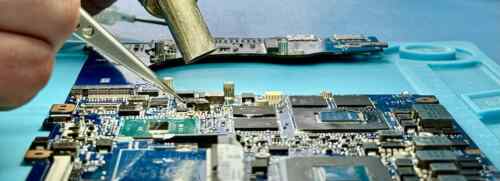
Components replaced under a microscope rather than a quote for a whole new board. On a ThinkPad the board is often the only part that is not user-serviceable.
Screen replacement
From plain HD on an IdeaPad to touch and OLED on a Yoga. Matched to the panel your model has. Three checks to run first.
Battery replacement
For a Lenovo that dies at 40%, or a swollen cell bowing the base. Straightforward on most ThinkPads.
Charging ports & power
A loose or damaged charging socket does not always mean replacing the motherboard. We check the port and charging circuit before recommending a repair.
Keyboard replacement
Dead or repeating keys, spills, and worn TrackPoint caps on the ThinkPads.
Yoga hinges & flex cables
The 360 hinge and the display cable that runs through it are what folding eventually costs you.
Diagnostics - when it will not turn on
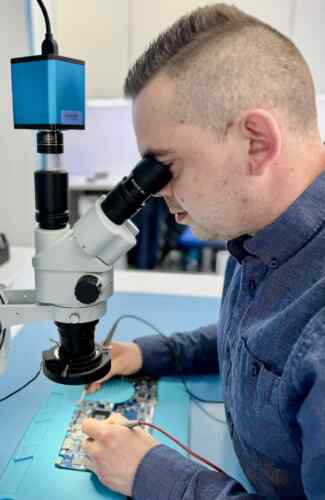
No power, no picture, or shutting down under load. We find where it stops before anyone quotes for anything.
Legion & LOQ thermals
Strip, clean and repaste, with temperatures measured under load before and after.
Supervisor passwords & asset locks
Ex-corporate ThinkPads that stop at a password screen. Proof of ownership required, always.
Windows & software faults
Blue screens and boot failures on a sound ThinkPad. A clean Windows install, drivers and all.
Something else?
Fans, ports, casings, storage, firmware.
Which Lenovo do you have?
Pick the name on the lid. On a Lenovo it also tells us how serviceable the machine is, which changes what a repair costs.
The most serviceable laptops made. Lenovo publishes the manuals, parts stay available for years, and that makes a five-year-old ThinkPad worth fixing when most rivals are not.
What we see most on these
- Batteries and keyboards - among the cheapest jobs we do
- Slim-tip and USB-C charging sockets
- Supervisor passwords on second-hand machines
A ThinkPad’s sensible cousin in a thinner aluminium case. Slightly less serviceable, still well supported.
What we see most on these
- Screens and bonded touch assemblies
- Charging ports
- Batteries at end of life
The Lenovo we see most. Cheap to repair, worth repairing, usually back within the week.
What we see most on these
- Screens - the widest range of panels
- Hinge wear cracking the lid corner
- Slow on a spinning drive - an SSD fixes it
A laptop that folds into a tablet, which means the hinge and the cable through it do the failing.
What we see most on these
- 360 hinge and display flex cable
- Cracked touch or OLED assemblies
- Swollen batteries lifting the trackpad
Thermals first. A gaming Lenovo that throttles or shuts down is usually blocked heatsinks and spent compound.
What we see most on these
- Throttling and shutdowns under load
- Board-level GPU and power faults
- High-refresh panels - matched, not substituted
Lenovo supplies a large share of school Chromebooks. We repair them in batches and quote per unit.
What we see most on these
- Screens and hinges from classroom handling
- Keyboards after spills
- Charging ports
Not listed? We still repair it - tell us what you have.
Why a ThinkPad Is Worth Fixing
Lenovo designs ThinkPads to be opened. That is not marketing - it changes what a repair costs and how long the machine stays useful.
Published Service Manuals
Lenovo puts the manual and the part numbers online for every model. No guessing, no forcing.
Parts Stay Available
Years after a model has gone. A five-year-old ThinkPad is usually worth repairing; most rivals of the same age are not.
Cheap Jobs Stay Cheap
Batteries, keyboards and drives on a ThinkPad are among the least expensive laptop repairs we do.
The One Catch
Second-hand ex-corporate machines often carry a supervisor password or an asset lock. We can usually help, with proof of ownership.
This is also why ThinkPad fleets are the easiest to handle in batches - the parts are predictable and so is the timescale.
Motherboard Repair, in Plain Terms
On a Lenovo the board is usually the only part you cannot replace yourself. It is the part we repair.
It Will Not Turn On
Power rails followed with a meter and a thermal camera until we find where the voltage stops.
BGA Rework
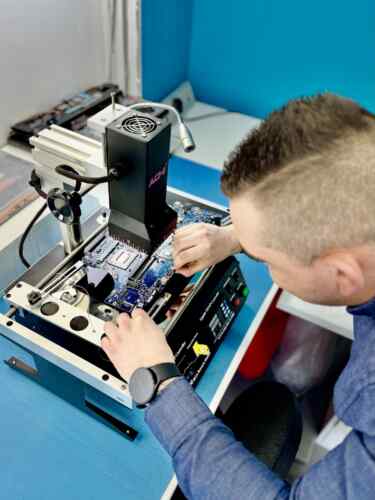
Reballing and replacing the large chips on a rework station with a controlled heat profile.
Component-Level Replacement
Capacitors, MOSFETs, voltage regulators, blown fuses.
Charging Ports
Slim-tip and USB-C sockets taken off and replaced, rather than replacing the board.
BIOS & Supervisor Passwords
Boot-locked ex-corporate machines. Proof of ownership required, no exceptions.
Corrosion Repair
Where a spill has taken out one circuit and left the rest working.
We diagnose before we quote, and quote before we touch anything.
Spilt Something on It? Do This Now
What you do in the next hour matters more than anything we can do afterwards. ThinkPads drain some spills through the base, which helps - but only if the machine is off.
-
1
Switch It Off Now
Hold the power button until it dies. A wet board survives being wet; it does not survive being powered while wet.
-
2
Do Not Plug It In
Not to charge, not to test. Every check you run costs you a component.
-
3
Bring It In Today
Upside down, lid open, charger out. Rice does nothing. Time is the only thing that helps.
The dangerous case is the one that dried out and still works - liquid keeps eating the board for weeks, so the failure turns up a month later. We strip it, clean the board ultrasonically, treat the corrosion and replace what has gone. If your files matter more than the laptop, tell us when you drop it off and we take those first.
Ways to Use Our Service
Two ways to get your Lenovo laptops repaired - bring it to Wimbledon, or post it from anywhere in the UK.
What We Do, How, and Why Us
Every Lenovo fault, from an IdeaPad screen to the work most shops will not take - boards repaired at component level, slim-tip and USB-C sockets re-soldered, Yoga hinges and the cables that run through them, and Legion machines stripped and repasted. One workshop in Wimbledon, and post-in from anywhere in the UK.
Diagnosis comes before a price, always. Microscopes, hot-air rework stations, a thermal camera to find the component running hot and a meter to follow the power rails until the voltage stops. On a ThinkPad we work to Lenovo’s own service manual, which is why these jobs are quick and predictable.
The alternative to a component-level repair is a whole new mainboard, and on a Legion or a ThinkPad P series that quote is close to what the laptop is worth. We find the part that failed and replace that one - and when it is not worth doing, you get told before you spend anything.
What Customers Say
Every repair carries a warranty. These are unedited reviews left on Google and Trustpilot.
Good to Know
The questions we are asked most about Lenovo laptops repairs.
Not answered here? Ask us - we reply the same working day.
Lenovo quoted me for a whole motherboard. Can you do better?
Usually, yes, and it is most of what our bench does. A service centre replaces the board because that is their process; we find the component that failed and replace that one. Diagnosis first, quote before any work.
I bought a second-hand ThinkPad and it asks for a password before Windows.
That is a supervisor password or an asset lock set by the company that owned it. We can often clear it, but only with proof the machine is yours - a receipt or the disposal paperwork. No proof, no work. That rule is not negotiable and it is the reason stolen machines do not get fixed here.
Is a five-year-old ThinkPad worth repairing?
More often than any other brand of the same age. Lenovo publishes the service manuals and keeps parts available for years, so batteries, keyboards and drives stay cheap and quick. We will tell you when it has gone past the point, but on a ThinkPad that point comes late.
How long will it take?
Book ahead so we can prepare the part. Selected battery and keyboard repairs can be completed while you wait; we confirm this for your model. Screens need matching parts, while board repairs and liquid damage need assessment first.
Have you got the part for my model?
Send us the model number and the repair you need. We check availability before booking your visit. Parts can often arrive next working day; touch and OLED displays may take longer.
My Yoga will not close properly or the screen flickers when I fold it.
That is the hinge and the display cable that runs through it, and both are wear items on a convertible. Caught early it is a cable; left long enough it takes the panel with it.
We have ThinkPads across the company. Do you handle business repairs?
Yes, and ThinkPads are the easiest fleet to work with - predictable parts, predictable timescales. Batches, invoicing, collection and return, one point of contact. Tell us how many and what is wrong.