Screen Repair

£280

Professional Surface Pro 7 screen replacement service.

We fix cracked screens, display problems and touch issues. Professional screen replacement using original Microsoft parts.

Read more details

How would you like to be served?

Mail In Service
Send it 2-5 day repair turnaround. Insured delivery.
Visit Our Store
Book and bring it in for possibly same day repair.

Battery Replacement

£250

Professional Surface Pro 7 battery replacement service. Fix poor battery life, unexpected shutdowns, swollen battery issue or power failures.

!
Screen damage may occur during battery access. Service price includes screen replacement if needed.

Read more details

How would you like to be served?

Mail In Service
Send it 2-5 day repair turnaround. Insured delivery.
Visit Our Store
Book and bring it in for possibly same day repair.

Charging Port Repair

£220

Surface Pro 7 charging port replacement service. We fix charging problems - device not charging, loose connections, or faulty ports.

!
Sometimes charging problems are actually battery or motherboard issues - we'll test first and provide a proper quote.

Read more details

How would you like to be served?

Mail In Service
Send it 2-5 day repair turnaround. Insured delivery.
Visit Our Store
Book and bring it in for possibly same day repair.

Windows Software Repair

Get a Quote

Professional software repair and troubleshooting service. We fix system errors, malware issues and application problems across all platforms.

Read more details

How would you like to be served?

Mail In Service
Send it 2-5 day repair turnaround. Insured delivery.
Visit Our Store
Book and bring it in for possibly same day repair.

Diagnostics Service

£39

Professional Surface diagnostic service - comprehensive fault identification.

We'll run detailed tests to identify problems and provide accurate repair cost estimates for your Surface device.

Read more details

How would you like to be served?

Mail In Service
Send it 2-5 day repair turnaround. Insured delivery.
Visit Our Store
Book and bring it in for possibly same day repair.

Data Recovery

£39

Professional diagnostic assessment for Surface data recovery potential.

Our experts thoroughly examine your Surface to determine data recovery possibility and provide detailed cost estimate. Secure evaluation process with confidentiality guarantee.

Read more details

How would you like to be served?

Mail In Service
Send it 2-5 day repair turnaround. Insured delivery.
Visit Our Store
Book and bring it in for possibly same day repair.

Liquid Damage Cleaning

£100

Professional Surface liquid damage cleaning and restoration service.

Specialised cleaning process to remove liquid damage and restore functionality. Assessment included with detailed repair options.

Read more details

How would you like to be served?

Mail In Service
Send it 2-5 day repair turnaround. Insured delivery.
Visit Our Store
Book and bring it in for possibly same day repair.

Book Your Visit

Get a Quote

Can’t find the exact service you need? No worries! Give us a call, drop us an email, or fill out the form below and we’ll get back to you as quickly as possible.

Let’s Talk Price

Split payment into 3 interest-free instalments with Klarna at checkout, or propose your own price below.

We’ll review your request and respond within 24 working hours.

Service Details

Common Surface Pro 7 Problems We Fix

From screen flickering to battery swelling, we handle all Surface Pro 7 issues with specialist expertise
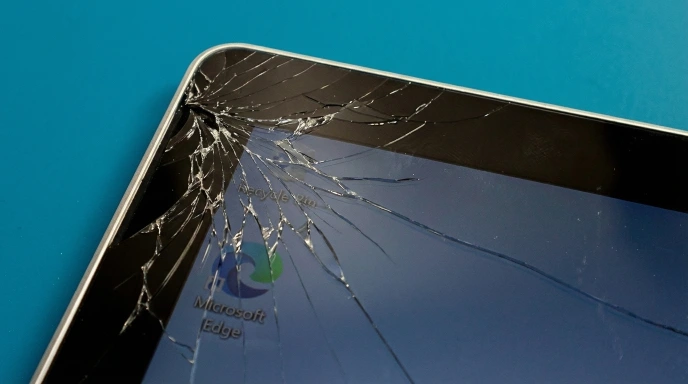
Surface Pro 7 cracked screen replacement

Cracked Screen Replacement

Dropped your Surface Pro 7 or cracked the glass? The screen and digitizer are fused together, so we replace the whole assembly. This is one of the trickiest tablet repairs because the glass is glued to the magnesium body. Our technicians use controlled heating and proper tools to avoid damaging internal components. Touch functionality fully restored.
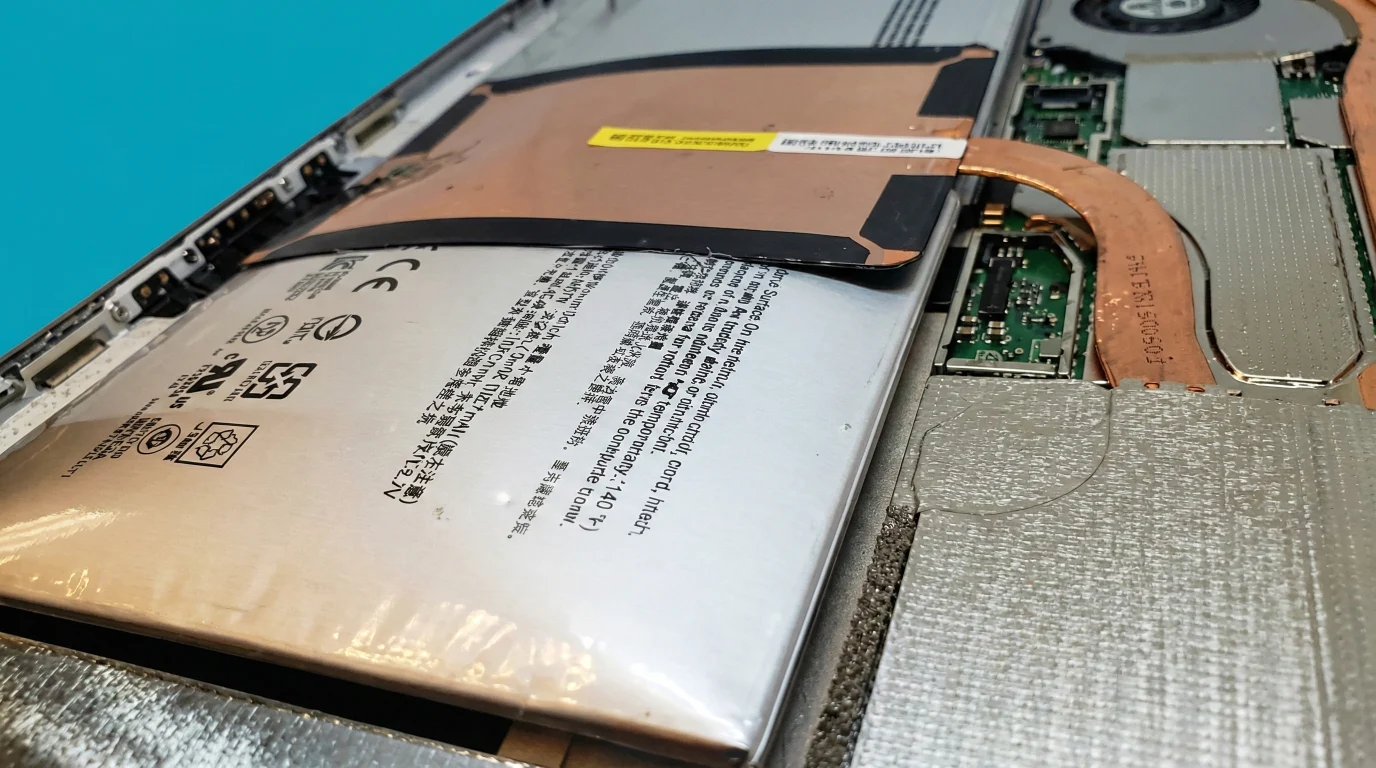
Repair time: 2-4 hours*
Surface Pro 7 swollen battery replacement

Swollen Battery Replacement

Surface Pro 7 screen popping out or lifting from the chassis? That’s a swollen battery pushing from inside – it’s a fire hazard and needs urgent attention. We carefully remove the screen, extract the dangerous battery, and fit a quality replacement. Battery life restored to near-original, and your device is safe to use again. Don’t leave this one.

Repair time: 3-4 hours*
Surface Pro 7 charging port repair

Charging Port Issues

Surface Connect port not charging reliably? Loose connection or only charges at certain angles? The magnetic charging port can wear out or get damaged. We diagnose whether it’s the port itself, the battery, or the charging circuit on the motherboard. Often we can repair rather than replace, saving you significant cost on this complex device.
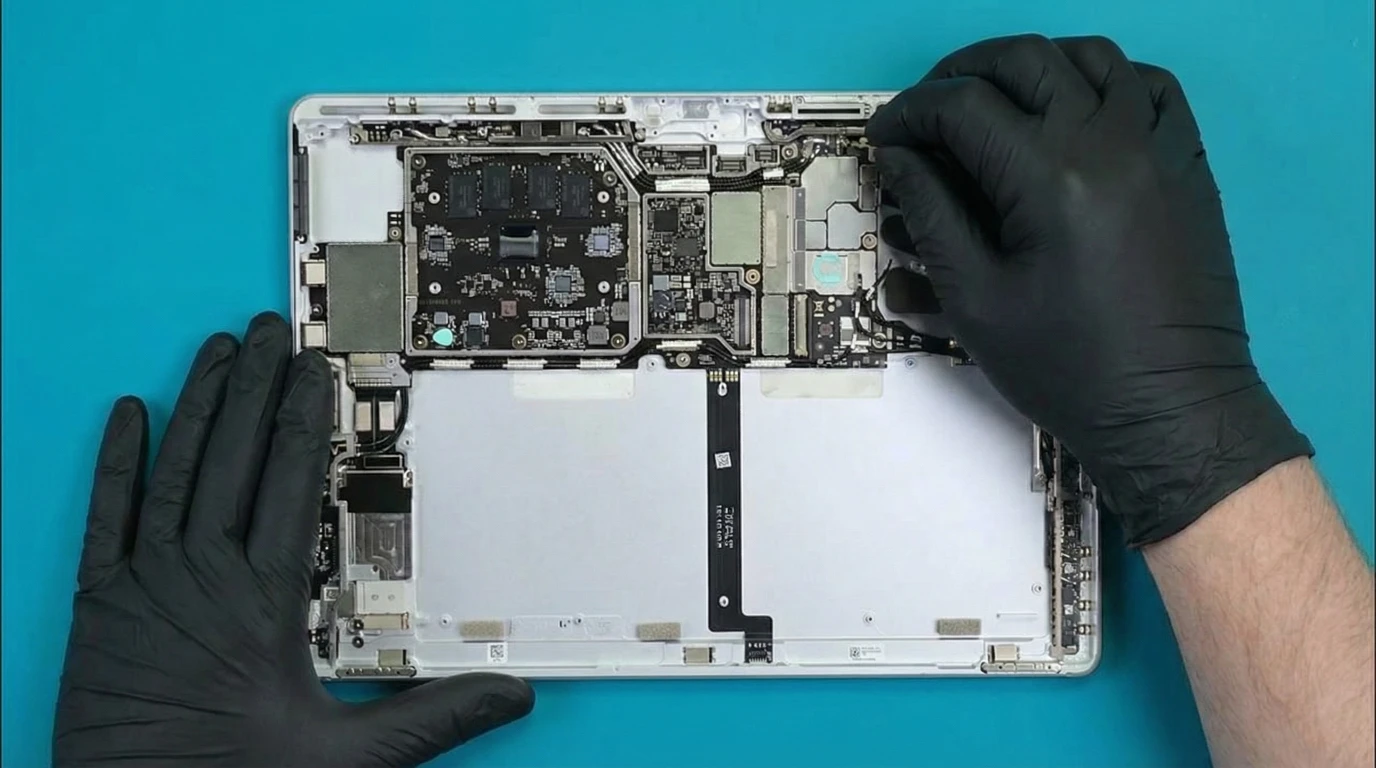
Repair time: 2-3 hours*
Surface Pro 7 not turning on repair

Device Won’t Turn On

Surface Pro 7 completely dead? Could be a failed battery, motherboard issue, or something simpler like firmware corruption. We start with a proper diagnosis – checking power circuits, battery health, and boot sequence. Many “dead” Surface devices can actually be revived with the right expertise and equipment. We’ll give you an honest assessment before starting.

Repair time: 2-7 days
Surface Pro 7 liquid damage repair London

Liquid Damage Recovery

Spilled something on your Surface Pro 7? Time is critical – turn it off immediately and bring it to us ASAP. We carefully open the sealed device, disconnect the battery, and ultrasonic clean the motherboard before corrosion takes hold. Surface devices are tricky because the screen must be removed to access internals. Quick action gives the best chance of recovery.
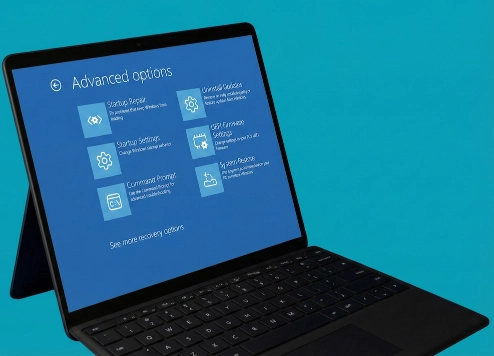
Repair time: 1-3 days**
Surface Pro 7 software repair and virus removal

Software Issues

Surface Pro 7 running slow, crashing, or infected with malware? We handle all software problems – from full Windows reinstallation and system recovery to virus and malware removal. We also troubleshoot boot issues, driver conflicts, and blue screen errors. Need your files back? We offer data recovery services for failing drives or accidentally deleted data.

Repair time: Needs assessment

* Same-day service completed within hours, provided replacement parts are prepared for your visit. We typically stock parts for next-day availability. If interested, please contact us first to confirm availability.

** Depending on whether the cleaning service detects damaged components and whether parts need to be ordered or the logic board repaired, the repair may take longer.

Ways to Use Our Service

Two convenient ways to get your Surface Pro 7 repaired – walk-in or mail-in service

Visit Fixfactor store for repair

Walk-in Repair

Victoria or Wimbledon workshops
1

Bring Your Surface Pro 7

Visit us at 136 Kingston Road, Wimbledon or Spaces, 25 Wilton Road, Victoria. No appointment needed for diagnostics.

2

Assessment & Quote

Quick visual inspection and email quotes are free. For complex or unclear issues, our £39 diagnostic service provides detailed analysis – refundable if you proceed with the repair.

3

Expert Surface Repair

Once approved, our technicians perform the repair using proper tools and quality parts. Most repairs 1-2 days.

4

Collect & Go

We notify you when ready. Collect your repaired Surface Pro 7 with full warranty coverage.

Mail in your device for repair

Mail-In Repair

Send from anywhere in UK
1

Request Quote Online

Describe your Surface Pro 7 issue using our online form. We’ll provide an initial estimate and shipping instructions.

2

Ship Your Device

Package your Surface Pro 7 securely (keep the Type Cover if it’s not the issue) and send to our repair center.

3

Professional Repair

We diagnose, confirm pricing, and repair your Surface with expert care. Email updates throughout the process.

4

Fast Return Shipping

Your repaired Surface Pro 7 shipped back with tracking and full warranty protection.

Fixfactor is a Microsoft Surface repair specialist.

With over 11 years of experience and 220,000+ repairs completed, we offer comprehensive, high standard Surface device repair services. The Surface Pro 7 is one of the most challenging devices to repair – the screen is glued in place, the battery is difficult to access, and many components are soldered to the board. Most repair shops won’t touch them. We’ve invested in the tools and training to do these repairs properly.

We deal with all Surface Pro 7 problems, from swollen batteries and charging failures to motherboard problems. We use controlled heating stations to safely remove screens and proper adhesive for reassembly. If your Surface is fine but running slow, we can refresh the software or upgrade the SSD.

Important: Screen damage risk. Any repair requiring device opening (except screen replacement on already damaged screens) carries a risk of screen damage due to the industrial-strength adhesive bonding. Sometimes our repair price includes this risk, but often it doesn’t. If there’s a possibility of additional cost due to screen damage, we always inform you before starting the repair – never after.

The Surface Pro 7 (Model 1866) was released in 2019 and has served many users well for years. Common issues we see include swelling batteries in older units, worn charging ports, and cracked screens. If you’re unsure what’s wrong, quick visual inspections and email quotes are free. For complex issues, our £39 diagnostic service provides detailed analysis – refundable if you proceed with repair.

Fixfactor cares also after the repair. All our repair services come with warranty. Satisfaction guaranteed! We maintain a 4.9★ Google rating. Read what customers say on Google or Trustpilot.

Your data stays safe. We don’t delete your files during repair. For privacy-sensitive customers, we can remove the SSD and leave it with you while we work on the hardware – we have test drives available. This option is possible for hardware repairs only.

Customer Reviews

Every repair comes with warranty, and our quality is confirmed by customer reviews since 2014.

I had an issue with the charging on my Surface Laptop. After pulling out my hair looking for companies to help – I found them on the internet – they did a fantastic job and really pleased with the service. Highly recommend.

D
David Logan Google Reviews

I had an issue with the motherboard and they fixed it in 2 days. Price wasn’t so bad either. I’ll go there again if I need to, definitely

A
Andrea Torres Google Reviews

If I could give 100 stars I would! I damaged my high spec tablet with accidental liquid damage. They worked non stop trying to fix it. Eventually found a way to mend a VERY expensive component.

A
Andy Google Reviews

Had a touchscreen tablet and the screen cracked. Took it in, super fast quote, they needed to get the parts in, arrived next day. Job done. Great service and great people—will go back for any other issues as the first choice.

A
Andrew Robinson Google Reviews

I’m very pleased with the service. My device had water damage and corrosion and had stopped working. I was worried I would have to buy a new one and had lost all my data. Fortunately Fixfactor were able to clean the motherboard and remove the corrosion.

C
Consumer Champion Google Reviews

Best service, visited a while back and was absolutely impressed by how swift and professional they were. I had stuck screw on my tablet motherboard and they fixed it in seconds

M
Michał Draszewski Google Reviews

Wow that was first class! Adam quickly diagnosed problem with my tablet, ordered the parts and installed the next day. Its so good to find and experience a friendly and professional service nowadays.

J
John Thumwood Google Reviews

The guys are very good at what they do. Repairing and fixing devices. My screen was totally smashed after it fell and they fixed it to the same quality as it was before. Very reasonable prices. Highly recommended.

S
S Hussein Google Reviews

Frequently Asked Questions

Common questions about Surface Pro 7 repair services

How long does Surface Pro 7 repair take?

Repairs take 2-3 hours when parts are available. Same-day service is possible if we have stock or can prepare parts before your visit or device arrival via courier. Complex cases with frame damage or motherboard work may require next-day completion.

Contact us to request same-day service and check parts availability for your specific repair.

Will my data be safe during the repair?

Screen, battery, and charging port replacements don’t directly affect your software or storage. We never intentionally delete customer data. However, we cannot guarantee data safety during hardware repairs.

By agreeing to the service, you accept responsibility for your data. We always recommend backing up important files before any repair.

Why is there a screen damage risk for battery or charging port repairs?

Surface Pro 7 battery and charging port replacements require screen removal to access the components beneath. The screen is strongly bonded with industrial-strength adhesive – we need to heat it and flex it slightly during removal.

Despite years of experience with Surface repairs, some screens crack during this process due to the nature of the adhesive bonding. In most cases, our repair price already reflects this screen damage risk. For certain devices where this risk is not included, we’ll contact you before starting the repair – never after the fact.

What if my frame is damaged?

Surface Pro 7’s magnesium frame often sustains damage during drops, particularly at corners. Bent frames prevent proper screen installation. We inspect and precision-align damaged frames using specialised tools – ensuring your new screen fits perfectly and functions properly.

Severely damaged corners may require additional work and incur a £50 charge – we’ll always inform you and get approval before proceeding.

My battery is swelling – is it dangerous?

If your screen is bulging or pushing outward, this indicates battery swelling – a potentially hazardous condition. Stop using the device immediately and don’t charge it. Swollen batteries can rupture or catch fire if punctured.

Contact us for urgent same-day battery replacement. Don’t try to puncture or force the screen back down.

How do I know if it’s a charging port or battery problem?

Sometimes charging problems aren’t port-related. Battery failures or motherboard issues can cause identical symptoms. We always perform comprehensive diagnostics testing the port, battery, and power management system before proceeding.

Try testing with a different Surface charger if possible – sometimes the cable or power adapter fails rather than the device’s port. Also check the port for visible debris or damage. If issues persist, professional diagnosis is needed.

Do you offer collection or courier service?

Yes, we offer nationwide courier service if you can’t visit our London locations. You can send your Surface Pro 7 to our repair centre from anywhere in the UK.

Contact us for shipping instructions and we’ll provide an initial estimate before you send your device.

Do you need access to my device for testing?

To properly test your Surface after repair, we need to boot into the operating system. We can use a guest account if available, or you can provide a user password. For some models, we can temporarily swap the SSD with our own test drive.

If you prefer not to provide access, we can only perform basic power-on testing – but full functionality testing is recommended to ensure your repair is 100% successful.

What warranty do you offer?

All Surface Pro 7 repairs include a comprehensive 6-12 month warranty (depending on supplier warranty on parts) covering both replacement parts and installation workmanship. Screen replacements performed during battery or charging repairs are also covered.

This warranty is valid at both our Wimbledon and Victoria stores in London. Terms and conditions apply.

Can I combine multiple repairs to save money?

Yes! With your Surface Pro 7 already disassembled for one repair, additional services cost less since the device is already open. Consider combining:

Battery replacement with screen repair, deep cleaning and thermal paste replacement, charging port repair, or SSD upgrade. These services have reduced labour cost when performed together. Ask our staff about multi-service discounts.

Surface Pro 7 Screen Replacement Service – Expert Display & Glass Repair

Cracked screen, display failure, or touch problems on your Surface Pro 7? Our specialised screen replacement service restores your device using original Microsoft parts and professional repair techniques developed through years of Surface expertise.

Microsoft Surface repair in london service fixfactor

What Screen Damage We Fix:

  • Cracked or shattered front glass
  • LCD display failures (no picture, backlight issues)
  • Touch functionality problems or dead zones
  • Surface Pen input not registering
  • Display flickering, ghosting, or vertical lines
  • Complete screen blackout after impact

Why We Replace the Complete Screen Assembly: Your Surface Pro 7 screen combines front glass and LCD display as one bonded unit. The display is extremely thin and fragile – attempting glass-only replacement invariably damages the LCD beneath. We always replace the entire screen assembly to ensure perfect results and maintain display quality.

Same-Day Service Available: If you need same-day service, repairs can be completed in 2-3 hours when parts are available – either in stock, or if we can prepare replacement parts before your appointment or before your device arrives via courier. Contact us to request same-day service and check parts availability for your specific model.

Frame Condition Matters: Surface Pro 7's aluminium frame often sustains damage during drops, particularly at corners. Bent frames prevent proper screen installation. We inspect and precision-align damaged frames using specialised tools – ensuring your new screen fits perfectly and functions properly.

Microsoft Surface screen repair service in london

Critical Repair Considerations: The Surface Pro 7 contains WiFi/Bluetooth antennas and speaker meshes positioned along the screen edges. These delicate components require careful handling during screen removal. Our technicians use controlled heating and specialised tools to protect these components throughout the repair process.

Original Microsoft Parts: We use only genuine Microsoft Surface Pro 7 replacement screens, pre-tested in our workshop. Each screen undergoes quality control for dead pixels, colour accuracy, and touch response before installation.

Professional Installation Process: Our Surface Pro 7 screen repair includes:

  • Careful screen removal preserving internal components
  • Thorough frame cleaning and inspection
  • Test fitting and alignment verification
  • Functional testing before permanent installation
  • Precision adhesive application for secure mounting

Comprehensive Post-Repair Testing: We verify display brightness and colour accuracy, complete touch functionality across all zones, Surface Pen compatibility and pressure sensitivity, camera and speaker operation, WiFi/Bluetooth connectivity, and proper Windows Hello functionality.

Microsoft Surface Pro 7 repair services in London by specialist shop FIXFACTOR

Battery Replacement Opportunity: With your Surface Pro 7 already disassembled for screen repair, consider these additional services at reduced labour cost:

  • Battery replacement – normally a high-risk procedure requiring screen removal, discounted when combined with screen repair
  • Deep cleaning and overheating service – thorough cleaning of the cooling system, thermal paste replacement on CPU/GPU, prevents overheating and improves performance
  • SSD upgrade (available for models with replaceable SSD only) – increase storage capacity, includes new drive installation, Windows installation, system configuration, and data transfer assistance

These services cost less when performed during screen repair since the device is already disassembled.

6-12 Month Warranty: All Surface Pro 7 screen replacements include a comprehensive 6-12 month warranty (depending on supplier warranty on parts) covering both replacement parts and installation workmanship. Your repair is protected for a full year.

What to Expect: Your Surface Pro 7 will function fully with complete touch sensitivity, full Surface Pen response, and original display quality. All features including Windows Hello facial recognition will work properly after our professional screen replacement.

Common Questions:

  • How long does the repair take? Repairs take 2-3 hours when parts are available. Same-day service possible if we have stock or can prepare parts before your visit/device arrival.
  • Will my data be safe? Your files, settings, and applications typically remain intact. While our procedures don't require accessing your operating system or data storage, we cannot guarantee data safety during hardware repairs. We recommend backing up important files before service.
  • What if my frame is damaged? We inspect and precision-align damaged frames. Severely damaged corners may require additional work and incur a £50 charge – we'll always inform you and get approval before proceeding.
  • Do you offer collection service? Yes, we offer nationwide courier service if you can't visit our London locations.
  • Do you need access to my device for testing? To properly test your Surface after repair, we need to boot into the operating system. We can use a guest account if available, or you can provide a user password. For some models, we can temporarily swap the SSD with our own test drive, but certain Surface models have soldered or non-standard storage. If you prefer not to provide access, we can only perform basic power-on testing – but full functionality testing is recommended to ensure your repair is 100% successful.

Diagnostics Available: Not sure if you need screen replacement? Bring your Surface Pro 7 in for diagnostics. Sometimes display problems stem from software issues, loose connections, or graphics driver faults that don't require screen replacement at all. We'll always give you an honest assessment before proceeding with any repair.

After repair we test the surface tablet for full functionality including the touch screen

Surface Pro 7 Battery Replacement Service – Expert Power Restoration

Battery draining quickly, unexpected shutdowns, or power failures on your Surface Pro 7? Our professional battery replacement service restores your device's power performance using high-quality replacement batteries and specialised repair techniques.

Microsoft Surface repair in london service fixfactor

Signs You Need Battery Replacement:

  • Battery drains within hours of normal use
  • Surface Pro 7 shuts down unexpectedly
  • Device won't power on despite charging
  • Battery percentage jumps erratically
  • Surface becomes unusually warm during use
  • Battery swelling (screen pushing outward)
  • Poor performance after 2+ years of use

Microsoft Surface screen repair service in london

Same-Day Service Available: If you need same-day service, battery replacements can be completed in 2-3 hours when parts are available – either in stock, or if we can prepare replacement parts before your appointment or before your device arrives via courier. Complex cases with frame damage may require next-day completion. Contact us to request same-day service and check parts availability.

Critical Service Information – Screen Damage Risk: Surface Pro 7 battery replacement requires screen removal to access the battery beneath. The screen is strongly bonded with adhesive – we need to heat it and flex it slightly during removal. Despite years of experience with Surface repairs, some screens crack during this process due to the nature of the adhesive bonding. In most cases, our battery replacement price already reflects this screen damage risk. However, for certain devices where this risk is not included in the price, we'll contact you before starting the repair to inform you about potential screen replacement costs – never after the fact.

Important: Data Backup Essential – Back up your files before service, as with any complex hardware repair.

High-Quality Replacement Parts: We use premium replacement batteries tested for capacity, voltage stability, and thermal performance. Each battery undergoes quality control before installation to ensure reliable long-term performance.

Comprehensive Testing: After battery replacement, we verify charging functionality and speed, battery percentage accuracy, power management and sleep/wake cycles, temperature monitoring during use, screen functionality and touch response, and all Surface Pro 7 features and connectivity.

Additional Repair Opportunities: With your Surface Pro 7 already disassembled for battery replacement, consider these additional services at reduced labour cost: deep cleaning and overheating service (thorough cleaning of the cooling system, thermal paste replacement on CPU/GPU, prevents overheating and improves performance), charging port repair (replace faulty charging port while device is already open), and SSD upgrade (available for models with replaceable SSD only – increase storage capacity, includes new drive installation, Windows installation, system configuration, and data transfer assistance). These services cost less when performed during battery replacement since the device is already disassembled.

6-12 Month Warranty: All battery replacements include a comprehensive 6-12 month warranty (depending on supplier warranty on parts) covering the replacement battery and installation workmanship. Screen replacements (if required) are also covered under the same warranty.

What to Expect: Your Surface Pro 7 will have restored battery life, accurate battery percentage readings, normal operating temperatures, and reliable performance without unexpected shutdowns.

Common Questions:

  • Why is screen damage risk possible? Microsoft uses industrial-strength adhesive bonding the screen to the chassis. The battery sits directly beneath, requiring complete screen removal. The display is extremely thin and fragile.
  • What if my screen gets damaged? In most cases, our battery replacement price already includes screen damage risk. For certain device conditions, additional costs may apply – we'll always get your approval first.
  • Should I back up my data? Yes, essential. While we don't delete data or access storage, we cannot take responsibility for data loss during repairs. Always back up important files before service, as with any hardware repair.
  • How long does battery replacement take? Standard repairs: 2-3 hours when parts available. Complex cases with frame damage: next-day completion.
  • Do you need access to my device for testing? To properly test your Surface after repair, we need to boot into the operating system. We can use a guest account if available, or you can provide a user password. For some models, we can temporarily swap the SSD with our own test drive, but certain Surface models have soldered or non-standard storage. If you prefer not to provide access, we can only perform basic power-on testing – but full functionality testing is recommended to ensure your repair is 100% successful.

Diagnostics Available: Not certain if your battery needs replacement? Sometimes charging issues, power management settings, or software problems cause symptoms similar to battery failure. Bring your device in for diagnostics – we'll run battery health tests and give you an honest assessment before recommending any repair.

Emergency Swollen Battery Service: If your screen is bulging or pushing outward, this indicates battery swelling – a potentially hazardous condition. Stop using the device immediately and don't charge it. Swollen batteries can rupture or catch fire if punctured. Contact us for urgent same-day battery replacement.

Windows 10/11 Software Repair Service – Complete Software Solutions for Surface Devices

Windows problems on your Surface device? System crashes, error messages, or performance issues? Our software repair service fixes all Windows-related problems, from minor glitches to complete system failures.

Common Software Problems We Fix:

  • Blue screen errors (BSOD) and system crashes
  • Windows won't start or boot properly
  • Extremely slow performance
  • Programs freezing or not responding
  • Virus and malware infections
  • Windows Update failures
  • Driver conflicts and hardware recognition issues
  • Corrupted system files
  • Login and password problems

Our Software Repair Process: We start with diagnostics to identify the exact issue. For minor problems, we repair Windows components while preserving your data and programs. For severe issues requiring Windows reinstallation, we first backup your important files, then perform a clean installation and restore your data.

Data Safety First: Before any major system changes, we create a complete backup of your documents, photos, and personal files. If Windows won't boot, we use specialised tools to access and save your data before proceeding with repairs.

Service Options: 1. System Repair - Fix specific Windows problems without reinstalling 2. Virus Removal - Complete malware scan and removal 3. Performance Optimisation - Clean unnecessary files, fix registry, update drivers 4. Clean Windows Installation - Fresh start with data preservation 5. Remote Support - Quick fixes via internet connection

What's Included:

  • Complete system diagnostics
  • Data backup before major repairs
  • Windows installation (if needed)
  • Essential driver installation
  • Windows activation assistance
  • Basic software setup (Office, browsers)
  • System optimisation
  • Security software recommendations

Time Requirements: Minor repairs and virus removal typically take 1-2 hours. Complete Windows reinstallation with data migration requires 2-4 hours depending on data volume. Remote support sessions usually resolve issues within 30-60 minutes.

Surface-Specific Expertise: We understand Surface devices' unique Windows configurations, including Surface-specific drivers, firmware updates, and recovery options. Our technicians work with Surface Pro, Surface Laptop, Surface Book, and Surface Go models daily.

Post-Repair Support: After service completion, we provide basic Windows tips, security recommendations, and guidance on preventing future issues. We'll show you how to maintain automatic backups and keep your Surface running smoothly.

What to Bring: Your Surface device, charger, and any passwords you remember. If you have Microsoft Office or other software licenses, bring those details for reinstallation.

Remote vs In-Person Service: Simple issues like software conflicts or minor errors can often be fixed remotely. Hardware-related software problems, severe infections, or complete system failures require in-person service.

Ready to fix your Surface Windows problems? Book your software repair service today.

Surface Data Recovery Service – Professional File Rescue from Damaged Devices

Lost access to important files on your Microsoft Surface? Device won't boot, has physical damage, or suffered liquid spill? Our data recovery service focuses solely on retrieving your valuable data without attempting device repair.

When You Need Data Recovery:

  • Surface won't turn on or boot Windows
  • Broken screen but need files urgently
  • Liquid damage making device unusable
  • Accidental factory reset or data deletion
  • Windows corruption preventing access
  • Hardware failure but data more valuable than device
  • Preparing to recycle damaged Surface

Our Data Recovery Approach: We assess your Surface to determine the best recovery method. For software issues, we use specialised tools to access drives externally. For hardware failures, we may need to physically remove the storage component (possible on Surface Pro 3, 4, 5, and Surface Book models).

Recovery Process Timeline:

  1. Initial assessment and recovery possibility evaluation
  2. Quote provided based on complexity
  3. Data extraction using appropriate method
  4. File verification and transfer to your chosen medium
  5. Typical turnaround: 48 hours (complex cases may take longer)

Critical Risk Disclosure: Screen Damage Warning: Most Surface data recovery attempts require screen removal to access internal storage. The screen is secured with extremely strong adhesive, and despite our experience and professional techniques, it may crack during removal. By proceeding with this service, you accept that your Surface may be returned with a damaged screen. Screen replacement costs are separate and not included in data recovery pricing.

BitLocker Encryption: Surface devices encrypt data by default using BitLocker. We'll need your BitLocker recovery key to access encrypted files. Without it, recovery may be impossible. Check your Microsoft account or organisation's IT department for this 48-digit key.

Service Terms:

  • Diagnostic Fee: £39 covers initial assessment and quote preparation
  • Recovery Fee: Additional charges apply only if you approve the quote and we successfully recover data
  • Unsuccessful Recovery: If data cannot be recovered, only the diagnostic fee applies
  • Screen Damage: You're responsible for screen replacement costs if damage occurs during service

Data Transfer Options: We can transfer recovered files to:

  • External hard drive or USB stick
  • New computer or device
  • Cloud storage service
  • Network attached storage

What We Recover: Documents, photos, videos, emails, browser data, desktop files, downloads folder, and application data where accessible. We cannot recover data from cloud-only files not cached locally.

Important Considerations: If we cannot recover your data or you decline the quoted price after assessment, your device will be returned in its current state - potentially with a damaged screen from the attempted recovery. Consider whether your data value justifies this risk before proceeding.

Before Sending or Bringing Your Device:

  • Note your BitLocker key if possible
  • List priority files/folders
  • Specify preferred transfer method
  • Inform us of any existing physical damage
  • Understand and accept the screen damage risk

Not Worth Repairing? If your Surface has extensive damage making repair uneconomical, data recovery lets you salvage what matters most. We focus exclusively on data retrieval, not device restoration.

Ready to recover your important files? Send or bring your Surface to our service centre for professional data recovery assessment.

Surface Pro 7 Charging Port Replacement Service – Professional Charging Solution

Surface Pro 7 not charging properly? Charging only at certain angles or not accepting charge at all? Our charging port replacement service restores reliable power connectivity using high-quality replacement components and expert repair techniques.

Microsoft Surface repair in london service fixfactor

Signs You Need Charging Port Replacement:

  • Surface Pro 7 won't charge at all
  • Charging only works at specific cable angles
  • Loose connection requiring constant adjustment
  • Intermittent or inconsistent charging
  • Charging cable doesn't stay connected
  • Physical damage to charging port
  • No response when charging cable plugged in

Important Diagnostic Step: Sometimes charging problems aren't actually port-related. Battery failures or motherboard issues can cause identical symptoms. We always perform comprehensive diagnostics before proceeding – if your issue stems from a different component, we'll provide an accurate quote for the actual repair needed. You're never charged for work you don't need.

Same-Day Service Available: If you need same-day service, charging port replacements can be completed in 2-3 hours when parts are available – either in stock, or if we can prepare replacement parts before your appointment or before your device arrives via courier. Complex cases involving frame damage may require next-day completion. Contact us to request same-day service and check parts availability.

Critical Service Information – Screen Damage Risk: Surface Pro 7 charging port replacement requires screen removal to access the port beneath. The screen is strongly bonded with adhesive – we need to heat it and flex it slightly during removal. Despite years of experience with Surface repairs, some screens crack during this process due to the nature of the adhesive bonding. In most cases, our charging port replacement price already reflects this screen damage risk. However, for certain devices where this risk is not included in the price, we'll contact you before starting the repair to inform you about potential screen replacement costs – never after the fact.

High-Quality Replacement Parts: We use original Microsoft charging port replacement parts. Each port is tested for charging efficiency and secure connection before installation.

Comprehensive Testing: After charging port replacement, we verify charging functionality at various power levels, charging port connection stability, power delivery and charging speed, battery charging indicators, secure port connection (cable stays in place), and screen functionality and touch response.

Microsoft Surface screen repair service in london

Additional Repair Opportunities: With your Surface Pro 7 already disassembled for charging port replacement, consider these additional services at reduced labour cost: battery replacement (restore power performance while device is already open), deep cleaning and overheating service (thorough cleaning of the cooling system, thermal paste replacement on CPU/GPU, prevents overheating and improves performance), and SSD upgrade (available for models with replaceable SSD only – increase storage capacity, includes new drive installation, Windows installation, system configuration, and data transfer assistance). These services cost less when performed during charging port repair since the device is already disassembled.

6-12 Month Warranty: All charging port replacements include a comprehensive 6-12 month warranty (depending on supplier warranty on parts) covering the replacement port and installation workmanship. Screen replacements (if required) are also covered under warranty.

What to Expect: Your Surface Pro 7 will charge reliably with secure connection, proper charging speeds and power delivery, restored battery charging indicators, and full functionality of all features.

Common Questions:

  • How do you know it's the port and not the battery? We perform comprehensive diagnostics testing the port, battery, and power management system. You'll receive accurate diagnosis before any repair begins.
  • What if screen damage occurs? In most cases, our charging port replacement price already includes screen damage risk. For certain device conditions, additional costs may apply – we'll always get your approval first.
  • Can I try anything before booking repair? Yes – test with a different Surface charger if possible. Also check the port for visible debris or damage. If issues persist, professional replacement is likely needed.
  • How long does the repair take? Standard repairs: 2-3 hours when parts available (in stock or prepared for your appointment). Complex cases: next-day completion.
  • Do you need access to my device for testing? To properly test your Surface after repair, we need to boot into the operating system. We can use a guest account if available, or you can provide a user password. For some models, we can temporarily swap the SSD with our own test drive, but certain Surface models have soldered or non-standard storage. If you prefer not to provide access, we can only perform basic power-on testing – but full functionality testing is recommended to ensure your repair is 100% successful.

Diagnostics Available: Not sure what's causing your charging issues? Bring your Surface Pro 7 in for diagnostics. We'll test the charging port, battery, power management system, and motherboard to pinpoint the exact problem. You'll receive an honest assessment and accurate quote before any repair work begins.

Try This First: Before booking this repair, test with a different Surface charger if possible – sometimes the cable or power adapter fails rather than the device's port. Also check the port for visible debris or damage that might prevent proper connection. If you're still experiencing issues after testing, professional port replacement is likely needed.

Microsoft Surface Diagnostics Service – Professional Problem Identification

Is something wrong with your Microsoft Surface? Our comprehensive diagnostic service identifies the exact cause of your Surface's problems and provides a clear repair solution with transparent pricing.

When You Need Surface Diagnostics:

  • Surface won't turn on or boot properly
  • Charging issues or battery problems
  • Screen display problems or touch malfunctions
  • Keyboard or trackpad malfunctions
  • Performance problems or random crashes
  • Software boot failures
  • Overheating or unusual noises
  • After liquid spills or physical damage
  • Multiple symptoms suggesting complex faults
  • Unpredictable behaviour after accidents

Our Surface Diagnostic Process:

  • Visual inspection – checking for damage, wear, or liquid ingress
  • High-risk disassembly – carefully removing strongly-glued screen (1-hour process)
  • Component testing – motherboard, battery, charging port, screen, keyboard
  • Motherboard analysis – multimeter testing of circuits and connections
  • Advanced testing equipment – microscopes, thermal imaging, oscilloscopes
  • Replacement part testing – using available components to isolate faults
  • Liquid damage assessment – motherboard cleaning if contamination suspected

Why Proper Surface Diagnostics Matter: Microsoft Surface devices have unique construction challenges. Similar symptoms can indicate completely different problems. We recommend diagnostics especially when you're unsure if there's more than one problem after liquid damage, or when your device behaves unpredictably after a serious accident.

Microsoft Surface Models We Diagnose:

  • Surface Pro – all generations
  • Surface Laptop – all models
  • Surface Book – all versions
  • Surface Go – all models
  • Surface Studio – desktop models

Critical Disassembly Risk Warning: Microsoft Surface devices require extremely risky disassembly procedures.The front screen is attached with industrial-strength adhesive that makes removal extremely challenging. We dedicate one hour to this delicate process, but screen breakage is possible despite our expertise. By proceeding with Surface diagnostics, you accept full responsibility for potential screen damage. If the screen breaks during diagnostic work, you will be responsible for the cost of screen replacement should you choose to proceed with repairs. We do not accept blame or liability for screen damage during this necessary diagnostic procedure.

Surface-Specific Limitations: Diagnosing Microsoft Surface devices may be limited by replacement parts availability. For latest Surface models with unusual problems, diagnostic capabilities may be restricted if test components aren't available. We strongly recommend emailing us with your Surface model and problem description before ordering this service.

Liquid Damage Discovery: If diagnostics reveal liquid damage signs, we'll contact you immediately. Liquid damage cleaning is a separate service requiring extensive additional work. However, if you proceed with liquid damage cleaning, the diagnostic fee will be credited toward the cleaning service cost. If you choose not to proceed with cleaning, the diagnostic fee remains non-refundable as the diagnostic work has been completed.

Choose Your Repair Strategy: Please specify your priority before diagnostics begin:

  • Device repair focus – concentrate on restoring full Surface functionality
  • Data recovery focus – prioritize retrieving your files even if device can't be repaired
  • Both approaches – attempt comprehensive solution (note: some procedures may risk data loss)

Important: Some diagnostic procedures and repair methods may require software reload, which could erase your data. Inform us if data preservation is your priority so we can adjust our approach accordingly.

After Diagnostics – Your Options: You'll receive:

  • Detailed fault identification – exactly what's wrong and why
  • Repair quote breakdown – parts, labour, and timeline
  • Parts availability assessment – realistic repair feasibility
  • Data recovery options – if Surface cannot be fully repaired
  • Warranty information – coverage for any work performed

If Your Surface Can't Be Repaired: When Surface devices are beyond economical repair due to parts unavailability or excessive costs, we may offer to purchase your device for parts value, or return it to you as-is. This option allows you to recover some value from an unrepairable device.

Important Diagnostic Terms:

  • Payment required upfront – diagnostic fee is charged before work begins
  • Non-refundable fee – applies regardless of diagnostic outcome
  • Credit toward repair – if you proceed with quoted repairs, diagnostic fee is deducted from total cost
  • Credit toward liquid damage cleaning – if liquid damage is discovered and you proceed with cleaning service
  • Screen damage responsibility – customer accepts full liability for potential screen breakage

Pre-Diagnostic Recommendation: Given the complexity and risks involved in Surface diagnostics, we recommend contacting us first with your specific Surface model and problem description. This allows us to assess diagnostic feasibility and inform you of any model-specific risks or limitations.

Ready for professional Surface diagnosis? Contact us first, then book your diagnostic service.

Microsoft Surface Liquid Damage Cleaning Service – Professional Water Damage Treatment

Spilled water, coffee, or other liquid on your Microsoft Surface? Time is absolutely critical. Liquid damage causes rapid corrosion that spreads through the motherboard, destroying components and circuit traces. Professional cleaning must begin immediately to stop oxidation and assess what can be salvaged.

Critical Surface Disassembly Risk: Microsoft Surface devices present extreme disassembly challenges due to industrial-strength screen adhesive. iFixit rates Surface repairability 1/10 - the worst possible score. Screen removal requires careful heating and separation techniques, but breakage is possible despite professional expertise. By proceeding with liquid damage cleaning, you accept full responsibility for potential screen damage during the necessary disassembly process. If the screen breaks, you will be responsible for replacement costs.

LAPTOP LIQUID DAMAGE REPAIR, WE CAN REPAIR LAPTOP DAMAGED BY WATER OR ANY OTHER DAMAGE, WITHIN FEW DAYS OR RECOVERY YOUR DATA

What Our Surface Liquid Damage Service Includes:

  • High-risk disassembly – careful removal of strongly-glued screen components
  • Complete device disassembly and damage assessment
  • Professional ultrasonic cleaning of motherboard and affected components
  • Specialist cleaning fluid designed for electronic corrosion removal
  • Microscopic inspection to ensure complete corrosion elimination
  • Controlled multi-hour drying process using professional equipment
  • Comprehensive diagnostic testing of all Surface functions
  • Detailed damage report and repair quote if additional work needed

The Surface Cleaning Process: Our ultrasonic cleaning system removes corrosion, mineral deposits, and contaminants from your Surface's circuit board and components. This process reaches areas impossible to clean manually and is essential before attempting any repair work on liquid-damaged Surface devices.

Common Surface Liquid Damage Issues:

  • Keyboard damage – especially critical in Surface Pro Type Covers and integrated keyboards
  • Motherboard component failure – power management chips, memory controllers, CPU areas
  • Port corrosion – Surface Connect, USB-C, and other connection points
  • Display connection issues – liquid can damage screen cables and connectors
  • Battery and charging system damage – requires component-level diagnosis
  • Complete motherboard replacement – sometimes necessary in severe cases

Surface-Specific Considerations:

  • Surface Pro models – require specialized Microsoft components and advanced techniques
  • Surface Laptop models – component availability varies by generation
  • Surface Book models – dual-system complexity increases repair challenges
  • All Surface devices – unique construction makes liquid damage particularly destructive

After Cleaning – Your Options: Following professional cleaning and diagnostic testing, we'll provide:

  • Detailed damage assessment – exactly which components are affected
  • Repair quote breakdown – costs for screen, motherboard repair, or component replacement
  • Timeline estimate – parts ordering typically takes 1-3 working days
  • Data recovery options – if the Surface can't be fully repaired

Data Recovery Priority: If your files are more important than the Surface itself:

  • Data recovery focus – we prioritize retrieving your files even if the Surface can't be restored
  • Working Surface focus – complete restoration to full functionality
  • Hybrid approach – attempt both data recovery and Surface repair where possible

Important Timing Considerations:

  • Immediate action required – every hour of delay allows corrosion to spread deeper
  • Diagnostic phase – first day involves cleaning and comprehensive testing
  • Parts procurement – replacement components typically arrive within 1-3 working days
  • Complex repairs – motherboard-level work may require additional time

Why Professional Surface Cleaning is Critical: Liquid creates invisible corrosion that penetrates circuit board laminate and destroys component connections. Microsoft Surface devices are particularly vulnerable due to their compact design and proprietary components. Without proper cleaning, seemingly minor issues worsen rapidly, making repairs impossible and causing total data loss.

Data Preservation Efforts: Where possible, we secure your data before beginning work to prevent loss during the cleaning process. However, some liquid damage scenarios may compromise data accessibility regardless of our preservation efforts.

Service Terms:

  • Professional cleaning and diagnostic services are charged regardless of outcome – they involve several hours of specialist technical work
  • Screen damage responsibility – customer accepts full liability for potential screen breakage during disassembly
  • No repair guarantee – this is a cleaning service designed to stop corrosion and assess repair possibilities
  • Parts replacement warranty – any components we install come with standard warranty coverage

Surface Cleaning vs Standard Laptop Cleaning: Surface devices require significantly more time and expertise due to their unique construction. The disassembly process alone takes longer and carries higher risk than standard laptops, which is reflected in the specialized nature of this service.

Act Immediately: Microsoft Surface liquid damage worsens rapidly due to the device's compact, sealed design. The sooner we begin professional cleaning, the better your chances of recovery – both for your device and your data. Don't attempt home remedies that could worsen the damage.

Ready to save your Surface? Book emergency liquid damage cleaning today.

Surface Pro 7 Screen Repair

Surface Pro 7 Battery Replacement

Windows Software Repair

Surface Data Recovery

Surface Pro 7 Charging Repair

Surface Diagnostics – Find Out What’s Wrong

Surface Liquid Damage Cleaning