?
All articles

Iphone Battery Draining Fast

Experiencing an iPhone battery draining fast is a multifaceted technical issue that often points to a mismatch between software demands and hardware health. While many users attribute rapid power loss solely to age, the reality involves complex interactions between background processes, background app refresh cycles, and the physical chemistry of lithium-ion cells.

We approach power management as a science, focusing on restoring the original efficiency of your device. Whether the cause is a high-drain system process or a hardware defect on the logic board, identifying the root cause is the first step toward a permanent solution. At Fixfactor, we specialise in identifying these nuances through logic board diagnostics and precision component testing.

Key Takeaways

  • Chemical Aging: Lithium-ion batteries have a finite cycle life; once capacity drops below 80%, performance throttling frequently occurs.
  • Software Optimisation: Background activity and “always-on” features are the most common non-hardware causes for rapid drain.
  • Environmental Factors: Temperature extremes significantly impact the internal resistance of the battery, leading to premature shutdowns.
  • Hardware Defects: An iPhone battery draining fast despite a new cell often indicates a short circuit or a faulty Tristar/Hydra IC on the logic board.
  • Professional Restoration: Moving beyond basic settings tweaks to advanced micro-soldering can extend a device’s lifecycle by years.

What Defines Rapid Battery Drain?

Rapid battery drain is defined as a significant, unintended loss of charge—often exceeding 10-15% per hour during standby—that cannot be attributed to active user interaction. It occurs when the device’s current draw exceeds the expected idle threshold due to software inefficiencies or hardware degradation.

  • Normal Behaviour: Losing 1-3% charge overnight (6-8 hours) while in sleep mode.
  • Abnormal Behaviour: Losing more than 20% charge overnight or the device feeling warm while tucked in a pocket.
  • The Fixfactor Standard: We aim to restore standby times to manufacturer specifications through calibrated replacement parts and software audits.

Feature Expected Impact Recommendation
Background App Refresh High (Continuous CPU cycles) Disable for non-essential apps
Location Services (GPS) Moderate to High Set to “While Using” only
Push Mail Moderate Switch to “Fetch” (Hourly or Manual)
5G Connectivity Moderate Use “5G Auto” to conserve power

The Core Causes of Rapid Power Depletion

Understanding why an iPhone battery draining fast has become a concern requires looking at the device as a holistic system. Power isn’t just “used”; it is consumed by specific hardware components reacting to software instructions. When these instructions are inefficient, or the hardware is failing, the result is a shortened runtime.

Chemical Degradation and Cycle Counts

Every smartphone uses a lithium-ion battery, which functions through the movement of ions between a cathode and an anode. Over time, chemical reactions create high internal resistance. This resistance makes it harder for the battery to deliver the peak power requested by the processor during intensive tasks.

We often see devices that report 90% health but still suffer from an iPhone battery draining fast. This is because “Maximum Capacity” is only one metric; “Peak Performance Capability” tells the real story of whether the cell can handle voltage spikes without crashing.

Software Conflict and Background Indexing

Major iOS updates often trigger a period of intense background activity. Your iPhone may spend several days re-indexing files, photos, and databases to ensure the Search functionality works correctly. During this “post-update soak,” you will notice your device running hotter and the battery percentage dropping quicker.

If this persists beyond 48 hours, it suggests a “runaway process.” This is a software bug where a specific application remains stuck in a high-power state, constantly pinging the CPU even when the screen is off. We recommend checking Settings > Battery to identify these outliers.

Advanced Diagnostics: Hardware vs. Software

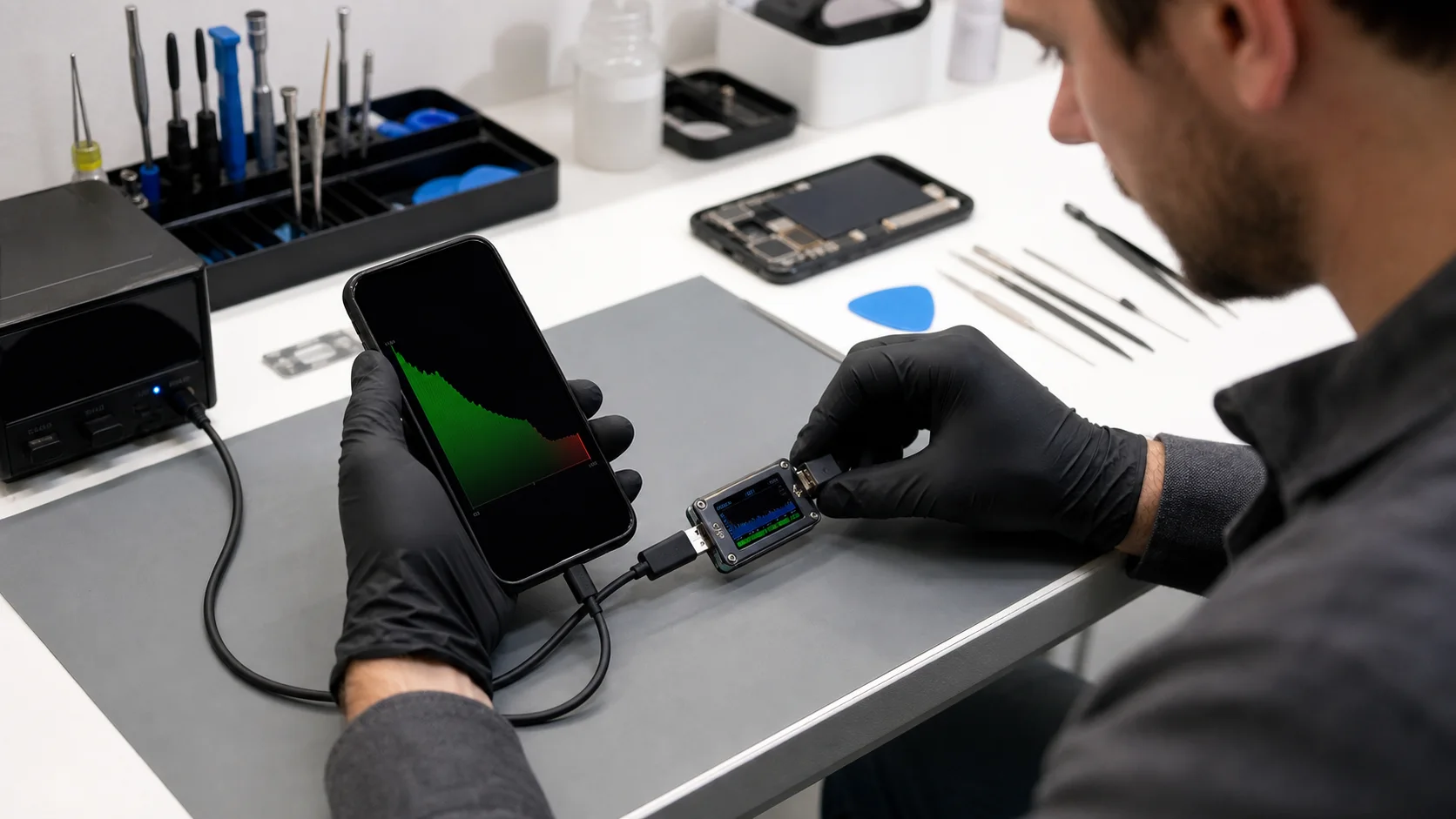
When an iPhone battery draining fast becomes a persistent issue, the first step is a clinical differentiation between a software bug and a hardware failure. Professional diagnostics service involve more than looking at the settings menu; they require monitoring the direct current (DC) draw from the motherboard.

The Role of the Logic Board

If you have already replaced your battery at a high-street shop and the problem persists, the issue likely lies within the logic board. The logic board contains integrated circuits (ICs) that manage power distribution. A common culprit is the Tristar or Hydra chip, responsible for managing the charging handshake and USB communication.

Damage to these components—often caused by non-certified charging cables—creates a “leak” where the board draws power even when the phone is off. This is where Fixfactor’s micro-soldering expertise becomes essential, as we can replace these specific chips without needing to replace the entire board.

Liquid Ingress and Corrosion

Even a microscopic amount of moisture can bridge two capacitors on the board, creating a resistive short. This short acts like a parasitic load, slowly but surely eating away at your charge. We utilise ultrasonic cleaning and component-level repair to neutralise corrosion and restore the board’s integrity, a process far more sustainable than device replacement.

Actionable Steps to Mitigate Battery Drain

Before seeking a professional iPhone repair, there are several precise adjustments you can make to your device’s configuration. These steps address the most common “silent killers” of battery life.

Refining Background Activity

Go to Settings > General > Background App Refresh. Most apps do not need to update their content while you aren’t using them. By limiting this to essential tools like Maps or Messaging, you significantly reduce the frequency with which the internal modem and processor must wake up.

  • Identify the Vampires: Check the “Battery Usage by App” list. If an app shows “Background Activity” for several hours but you only used it for minutes, delete and reinstall it.
  • Manage Notifications: Every time your screen lights up for a notification, power is consumed. Audit your “Notifications” settings and disable anything non-vital.
  • Display Brightness: Utilise “Auto-Brightness.” Sensors are tuned to balance legibility with power conservation, preventing the backlight from drawing more current than necessary in dim environments.

Connectivity and Network Settings

Your iPhone’s modem is one of the most power-hungry components. If you are in an area with poor 5G or 4G coverage, the modem will increase its power output to try and maintain a stable connection. This “hunting” for signal is a primary driver for an iPhone battery draining fast.

Switching to Wi-Fi whenever possible is a more efficient way to handle data. Furthermore, using “Low Power Mode” isn’t just for when you reach 20%. Turning it on earlier in the day proactively throttles the CPU and certain visual effects, extending your available uptime by up to 30%.

Professional Restoration at Fixfactor

While software tweaks offer temporary relief for healthy devices, a hardware problem requires a comprehensive solution. We don’t just “fix it”; we restore it to its peak operational state using precision-engineered parts and laboratory-grade equipment.

Component-Level Repair vs. Modular Swap

Most repair shops only offer “modular” swaps—they take out an old battery and put in a new one. If the problem is a faulty power management IC (PMIC) on the logic board, a new battery will degrade just as quickly as the old one.

At Fixfactor, our technicians perform logic board diagnostics to ensure the board’s power rails are stable. If we detect an abnormal amp draw, we transition to micro-soldering to replace the specific failing component. This surgical approach ensures the highest success rate and prevents future issues.

The Importance of Quality Parts

Cheap, third-party batteries often lack the sophisticated safety circuitry found in original or high-capacity premium cells. These substandard parts can report incorrect charge levels and may even lack thermal protection, leading to overheating. We stand by our work with our warranty, ensuring you receive a part that meets or exceeds original specifications.

Environmental and Sustainability Considerations

Choosing to restore your device instead of replacing it is a powerful statement for sustainability. E-waste is a global crisis, often exacerbated by the “disposable” culture encouraged by manufacturers. By opting for a professional repair, you are extending the lifecycle of a high-end piece of hardware.

Every iPhone battery draining fast that we resolve represents one less device in a landfill. Our “repair-first” philosophy is designed to give your smartphone a second life, providing value not just for your wallet, but for the environment. You can read more about our commitment to this on our About Us page.

Maximising Longevity Post-Repair

Once we have restored your device, maintaining its health is a collaborative effort. Follow these professional guidelines to ensure your new battery lasts for its full 500-800 cycle rating:

  1. Avoid Heat: Never leave your iPhone on a car dashboard or in direct sunlight. Heat is the primary enemy of lithium-ion stability.
  2. Optimised Charging: Enable “Optimised Battery Charging” in settings. This allows the iPhone to learn your routine and wait to finish charging past 80% until you need it.
  3. Use Quality Cables: Only use MFi-certified (Made for iPhone) cables and reputable power bricks. Poorly regulated voltage from “cheap” chargers can damage the charging IC.

Advanced Troubleshooting: The Logic Board “Leak”

In some rare cases, an iPhone battery draining fast is caused by a failure in the charging circuit. The device might show it is charging, but the current is actually heat-dissipated before it reaches the battery cell. This is often accompanied by the phone feeling warm near the side buttons or the Apple logo.

Our technicians use thermal imaging cameras to “see” these heat spikes on the logic board. This allows us to pin-point a shorted capacitor that is only a few millimetres in size. By removing the short, we stop the parasitic drain instantly. This level of advanced repairs is what separates Fixfactor from the standard high-street experience.


// Conceptual logic board power rail check
PowerRail_VCC_Main: 3.8V (Status: Stable)
Current_Draw_Idle: 0.05A (Status: High - Potential Leak)
Component_Test: U2_IC (Status: Fail)
Resolution: Micro-soldering replacement required

Frequently Asked Questions

Why is my iPhone battery health dropping so quickly?

Battery health is an estimate of remaining capacity relative to when it was new. Heat, using the phone while charging (gaming specifically), and high-wattage fast chargers can accelerate the rate at which the chemical health drops. If you see a drop of more than 1% per month, it may be time for a professional assessment.

Can a software update cause my iPhone battery to drain fast?

Yes, but it is usually temporary. Following an update, iOS performs massive background tasks like re-indexing your file system. However, if the drain persists for more than a week, it is likely that the update has surfaced an existing hardware weakness or there is a bug within a specific third-party app.

Is it worth replacing the battery or should I buy a new phone?

Replacing a battery is significantly more cost-effective and environmentally friendly than purchasing a new device. Most iPhones from the last 4-5 years are still incredibly fast and capable; a professional battery swap can make a three-year-old phone feel like new again.

Does “Low Power Mode” damage the battery over time?

Not at all. Low Power Mode simply reduces the electrical demand on the battery by slowing down the processor and reducing background activity. It is completely safe to use and is one of the most effective ways to manage a day of heavy use.

Can Fixfactor fix battery issues on other devices?

Absolutely. While we are experts in Apple hardware, we apply the same component-level repair standards to our Samsung repairs, laptops, and even drones. Whatever the hardware, we have the tools to diagnose and restore its power management system.

What happens if a new battery doesn’t fix the problem?

This is where our expertise shines. If a battery replacement doesn’t resolve an iPhone battery draining fast, we perform a deep dive into the logic board. We don’t guess; we use precision tools to find the exact component causing the power leak and provide a transparent quote for the necessary micro-soldering.

Whether you choose to visit our Victoria Repair Centre or our Wimbledon Repair Centre, you can expect the same master-craftsman approach to your technology. We believe in transparency, technical excellence, and the value of a repair done right the first time.

Share Copied!
Marcin Skwiercz

Written by

Marcin Skwiercz

Founder & Director

Running Fixfactor since 2014 with a hands-on background in microsoldering and board-level repair. Today focused on growing the business, tracking industry trends, and making sure every device gets the attention it deserves.